How do you take a Lovable app to production safely?
You take a Lovable app to production safely by auditing access control before real customers arrive: row-level security policies, exposed service-role keys, backend function permissions, and file storage. Then you prove each fix with direct API requests from users who should be blocked, and confirm authorised users still work. Evidence decides the launch.
I'm Hassan, and I run Tech Emulsion, an AI-native software agency. We have hardened or fixed Lovable apps including BillboardIQ, JobTrek Pro, ArtGola, AutoCar Intelligence, Content Compass, and Conversa. The pattern repeats. The app works, the founder is about to onboard paying customers, and nobody has checked what a user can reach outside the normal screens.
This post is for that founder, and for the agency owner whose team shipped a client app in Lovable and now needs to hand it over with confidence. By the end you should be able to answer one question: can I launch this as it stands, does it need targeted fixes, or does it need an engineer?
Why can a working Lovable app still fail its first security test?
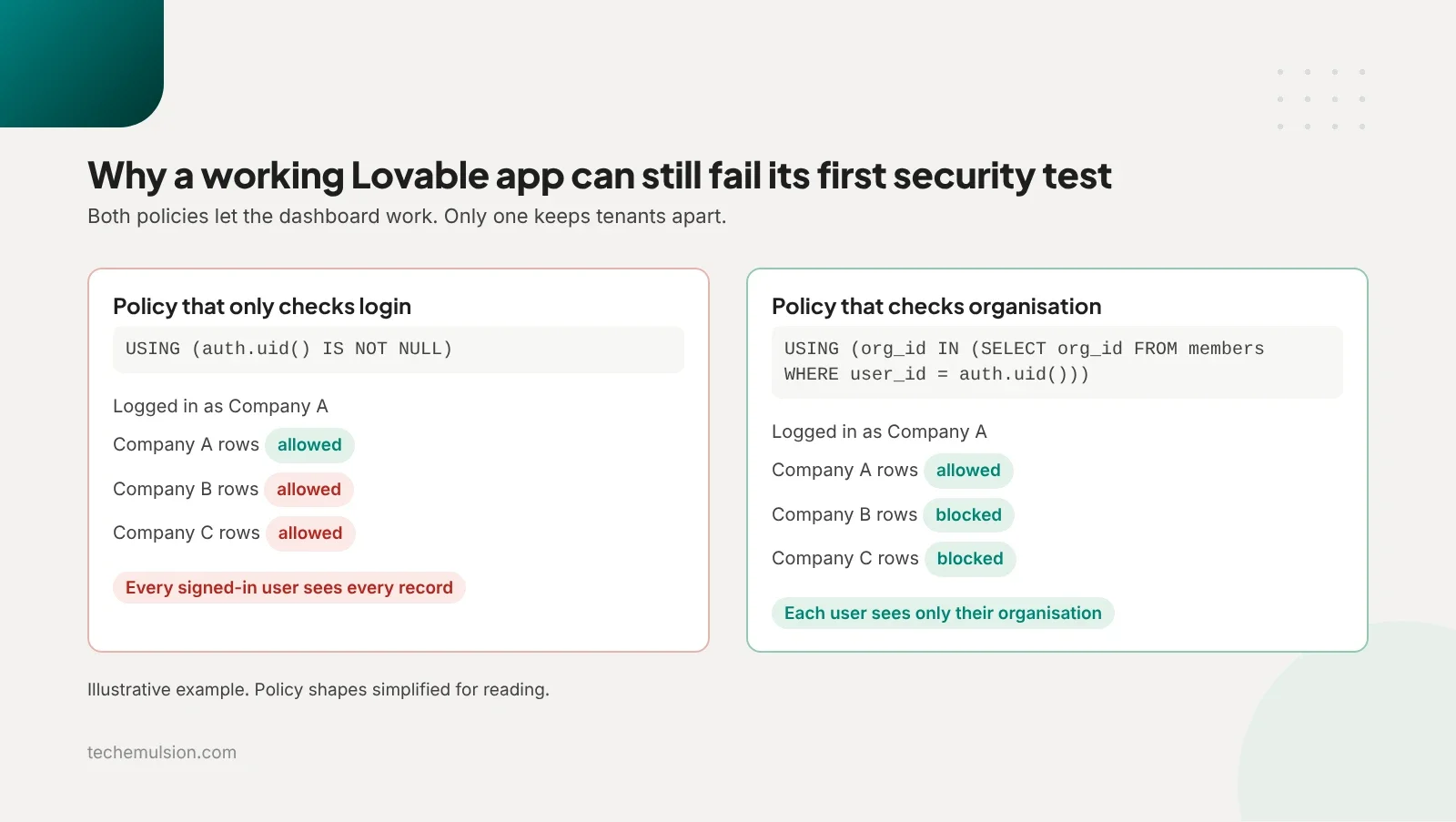
Lovable builds on Supabase, which exposes your database through a REST API the browser calls directly. RLS, row-level security, is the Postgres feature that filters every query so a user only sees the rows a policy allows. When the policy is wrong, every screen is a thin wrapper over an open database.
Here is the gap I see most. Lovable, like most AI builders, writes a policy that checks whether someone is logged in, without checking whether the row belongs to that user's organisation. The dashboard looks right because the frontend only fetches the current user's data. The API returns everyone's data to anyone who asks.
What did we find in one Lovable client portal before launch?
The clearest example is a client portal built in Lovable with Supabase handling auth, the database, and file storage. Businesses used it to manage customer records, assign work to staff, upload documents, and ask an AI assistant about them. Tech Emulsion came in before the founder opened it to paying customers. The client stays anonymous until we have permission to publish.
The audit took three working days. The findings:
- Inconsistent RLS. Some tables had policies that let any authenticated user read every record. A couple of supporting tables had no RLS at all.
- A Supabase service-role key in the frontend code. The public anon or publishable key is meant to be visible in a browser. The service-role key bypasses RLS entirely, so we treated it as compromised and rotated it.
- Role checks that lived only in the UI. Admin buttons were hidden, but the backend functions behind them did not check the caller's role.
- One function trusted an organisation ID sent from the browser without checking membership.
- Customer documents sat in public storage buckets that the interface made look private.
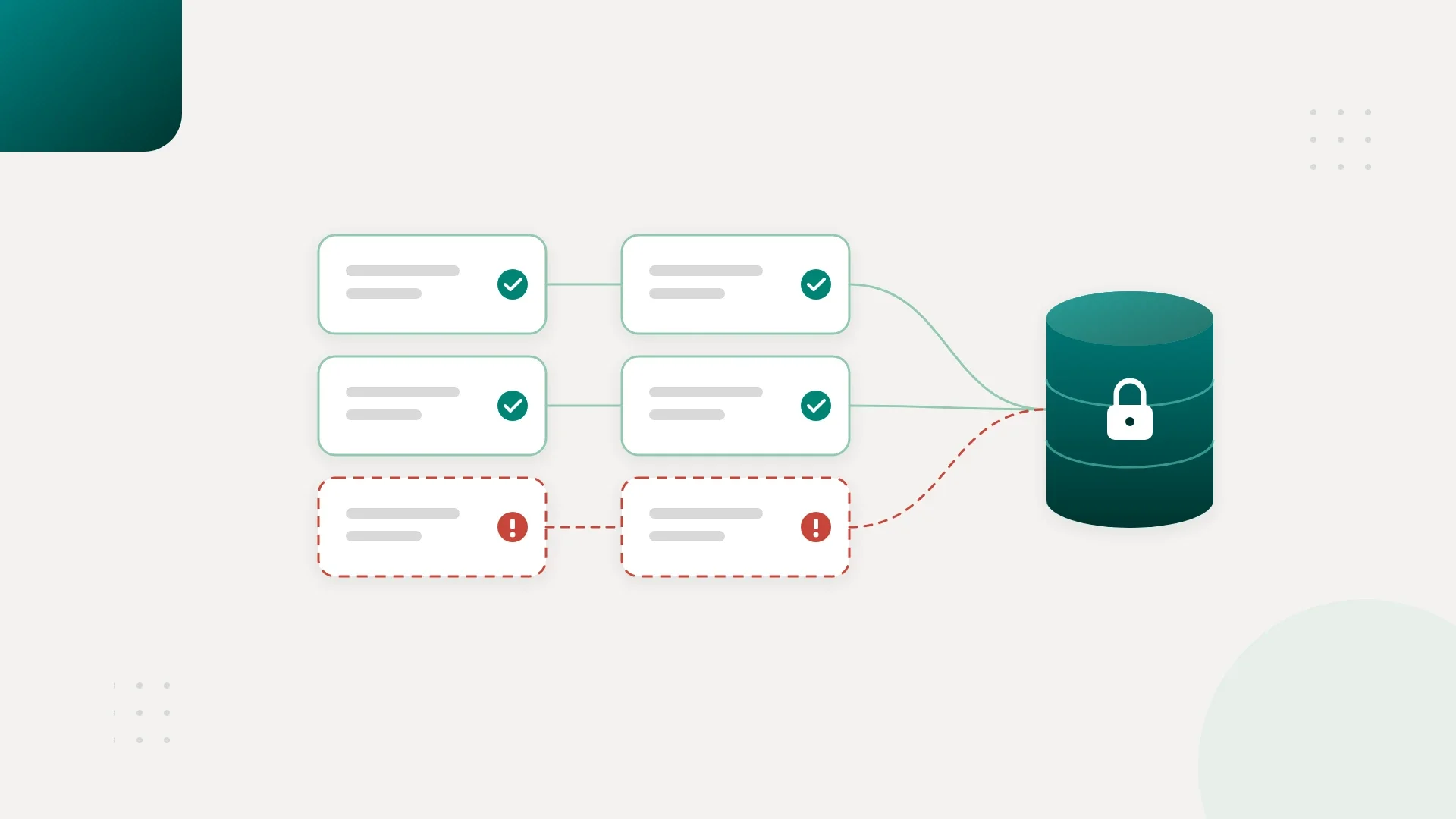
Before the fixes, our test accounts reached another organisation's records through four API paths, called two admin operations as a regular user, and downloaded documents without signing in. Separately from those API paths, the most useful finding came from tracing the same customer records through six access routes: list screen, detail screen, search, CSV export, document download, and AI assistant retrieval. Four respected organisation boundaries. Two did not.
The CSV export accepted an organisation ID from the browser and queried with elevated credentials. AI retrieval searched across all organisations before filtering, so another tenant's content could reach the model.
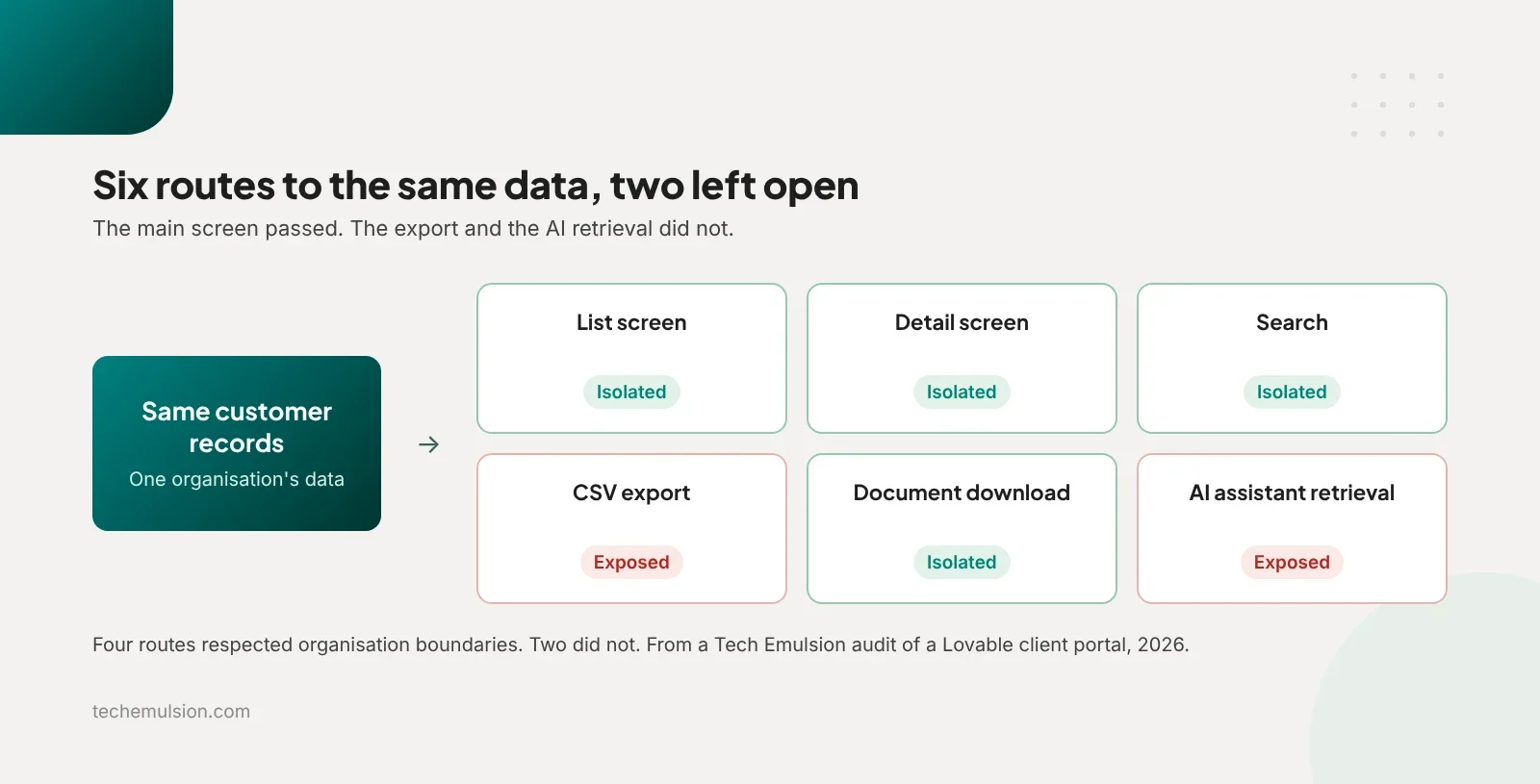
The main screen can pass its isolation test while another route to the same data stays wide open. That shapes every audit we run.
How did we harden the app, and what did the retest show?
Remediation took five working days and touched the whole app, because we never leave tables unchecked. We reviewed all 18 database tables and rewrote the RLS policies on 12 of them, covering reads, inserts, updates, and deletes against organisation membership and role. We reviewed eight server-side functions and updated five to enforce authentication, role checks, and input validation.
We made both storage buckets private, added storage policies, and switched downloads to short-lived signed URLs. We restricted who can change roles or organisation membership so users cannot promote themselves. The CSV export now checks membership on the server and derives the permitted scope there. AI retrieval now applies tenant and user permissions before any content is selected for the model.
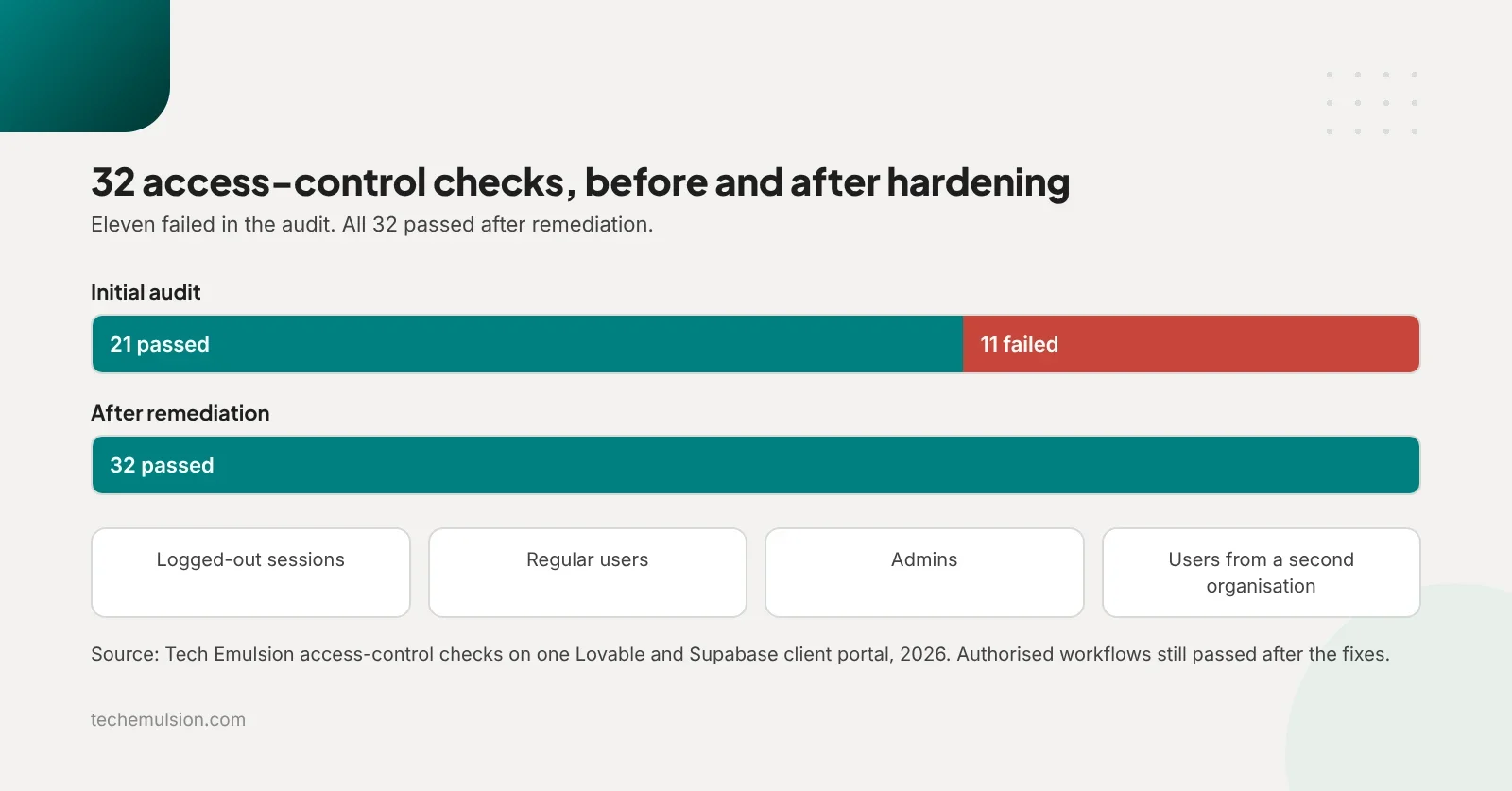
Then we retested. We ran 32 access-control checks across logged-out sessions, regular users, admins, and users from two separate organisations.
Eleven had failed in the original audit. All 32 passed after remediation, and authorised users could still complete every workflow. Two more days of regression testing and handover brought the engagement to about two weeks.
What is the Lovable and Supabase security audit process we use?
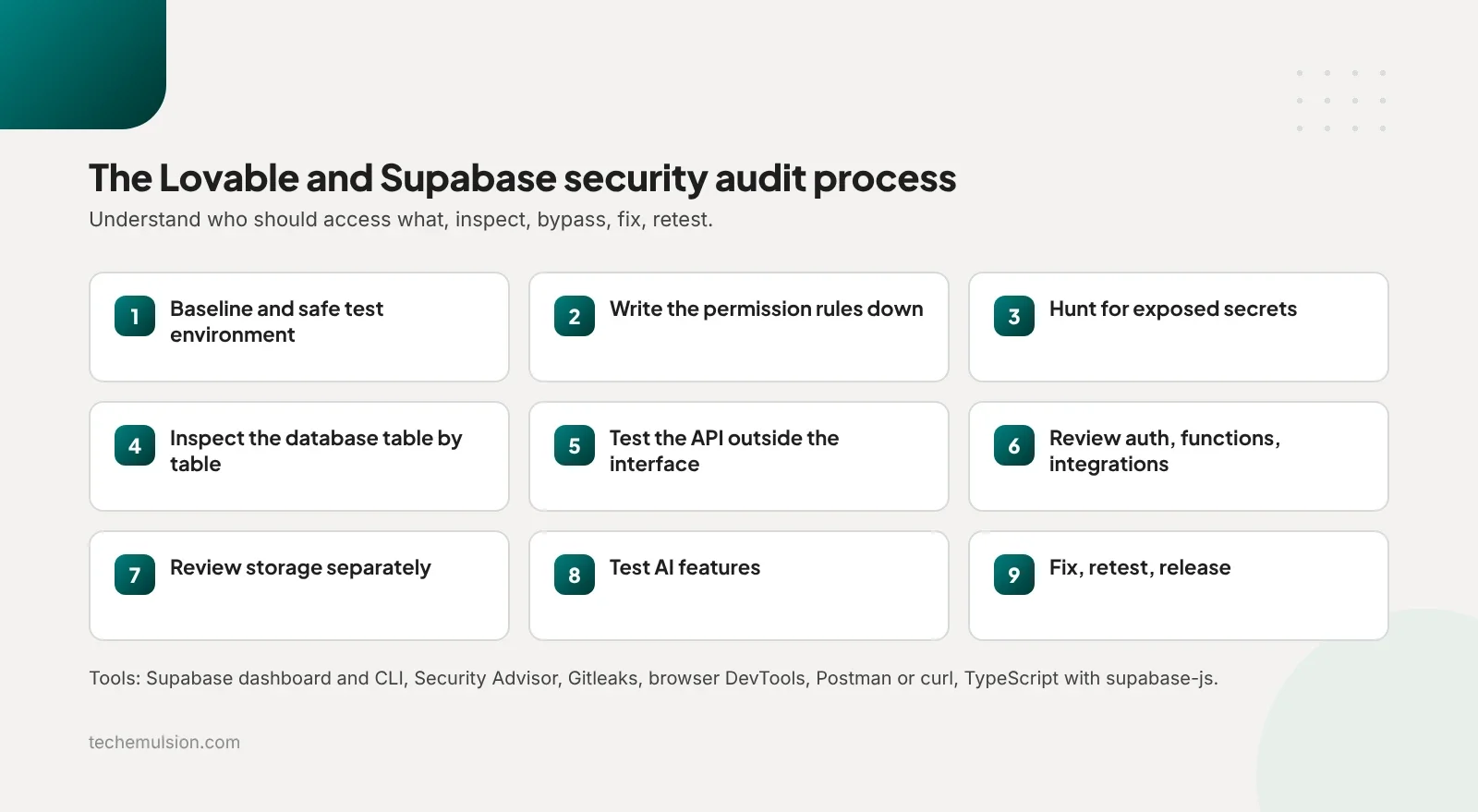
The order matters. Understand who should access what, then inspect how that is enforced, try to bypass it, fix the gaps, and repeat the tests.
- Baseline and a safe test environment. Map workflows, roles, integrations, and sensitive data. Record the current code and database state, confirm backups exist, and set up staging with synthetic records. Tests that change or delete data run there.
- Write the permission rules down. A matrix of what a logged-out visitor, regular user, organisation admin, and platform admin may do, plus two test organisations with separate users and records.
- Hunt for exposed secrets. Scan source, Git history, frontend bundles, environment variables, and network requests with Gitleaks and repository search. A secret in old commits gets rotated, since deleting it from the latest code changes nothing.
- Inspect the database table by table. RLS status, each policy for each operation, grants, views, and functions with elevated privileges. Supabase's Security Advisor flags configuration issues, and we review every flag against the intended behaviour.
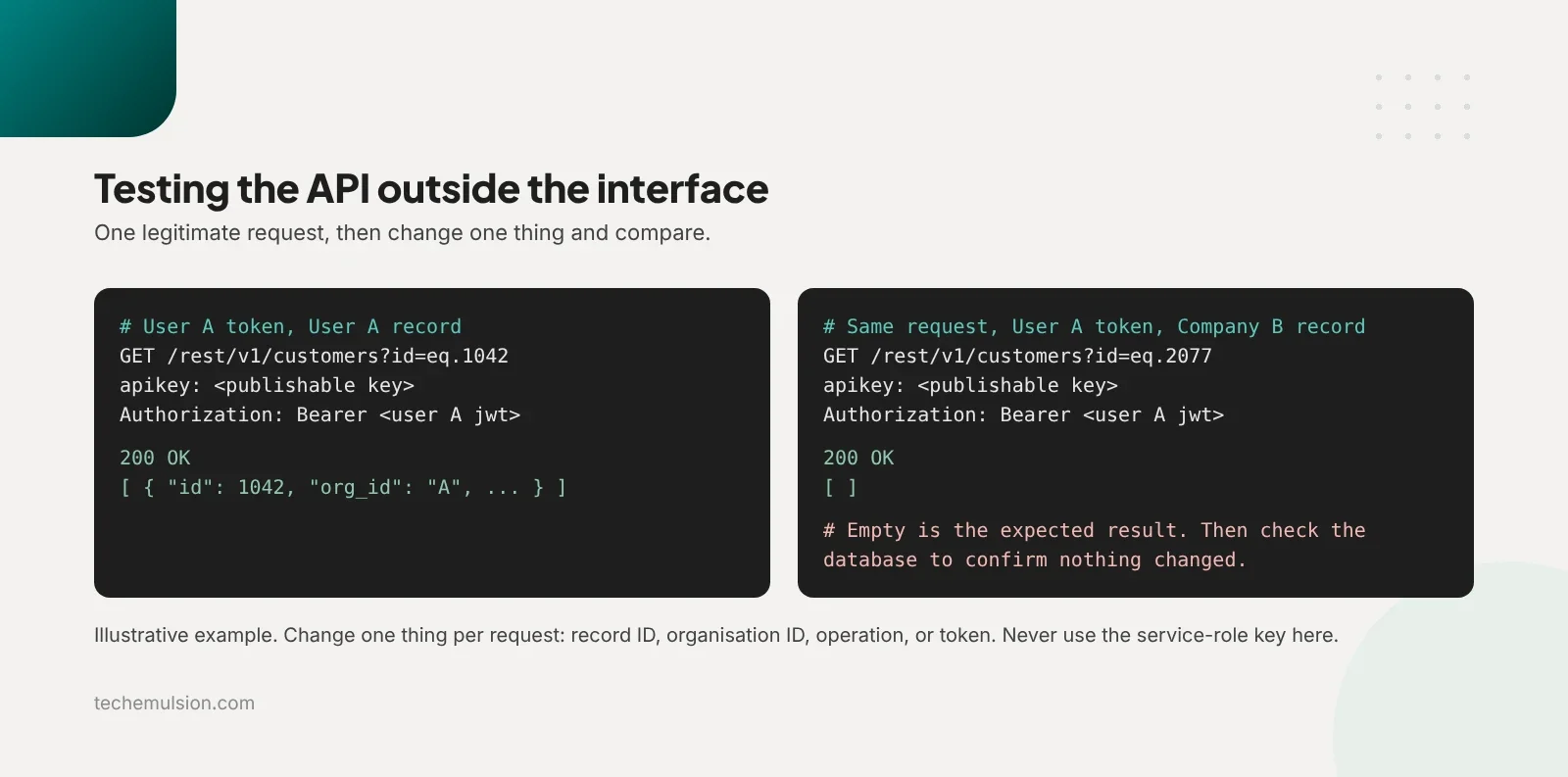
- Test the API outside the interface. Capture a legitimate request in DevTools, reproduce it in Postman or curl, then change one thing: the record ID, the organisation ID, the operation, or the user token. Signed-in tests use the public key in the apikey header and the user's JWT in the Authorization header. The service-role key never appears here, because it bypasses RLS and proves nothing. Repeatable checks go into a TypeScript script using fetch or supabase-js.
- Review auth, backend functions, and integrations. Signup, invitations, password reset, role changes, account removal. Every function gets checked for authentication, permission checks, input validation, and any use of elevated credentials. Webhooks get signature verification and duplicate handling, and we check whether prices or payment status are trusted from the browser.
- Review storage separately. Bucket visibility, policies for list, upload, download, replace, and delete, signed-link expiry, file type and size limits. Database permissions do not cover storage.
- Test AI features where they exist. What enters the model's context, which tools it can call, and where permissions are enforced. We plant synthetic prompt-injection text in uploaded documents and tool results and check whether the system can be pushed into exposing another tenant's data or taking an unauthorised action.
- Fix, retest, release. Each finding gets a reproduction, expected behaviour, impact, and fix. Changes ship as version-controlled migrations. We rerun the failed tests and the legitimate journeys, check production config, monitoring, backups, and rollback, then smoke test after deploy.
One detail from step five trips people up. A request that returns no error has not necessarily succeeded, and an empty response does not prove nothing changed. We inspect the database state after each test, so the evidence is that unauthorised data stayed unreachable and unauthorised writes did not happen.
Auth enforced in the backend, queries scoped by tenant, webhooks verified: these invisible guarantees are where vibe-coded apps fail, which I covered in the new moats for software agencies in 2026.
How do you secure AI features in a Lovable app?
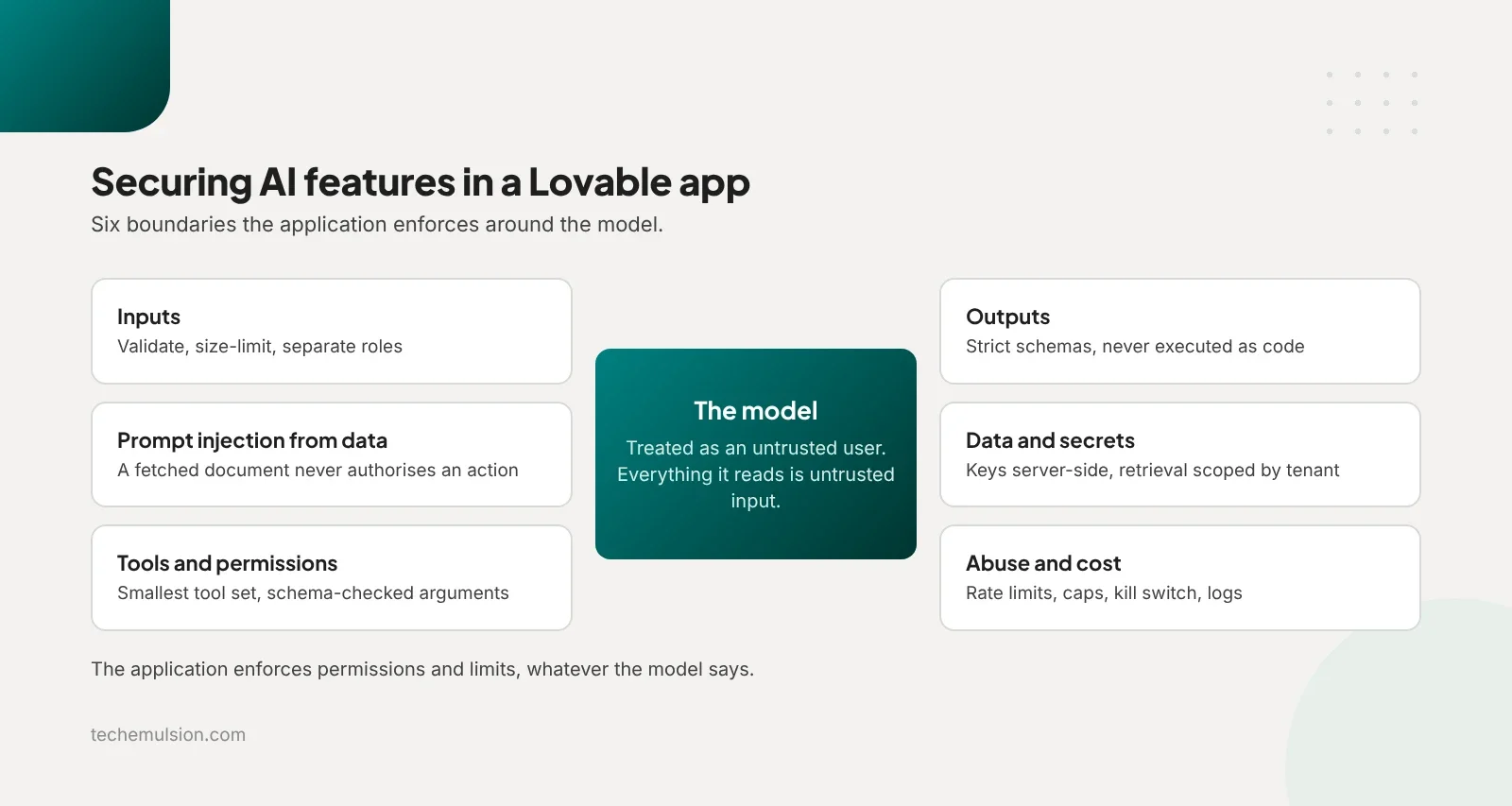
More of the Lovable apps we see now ship with an assistant or an agent that takes actions. We treat the model as an untrusted user and everything it reads as untrusted input.
- Inputs. Validate and size-limit user input. Keep system instructions and user content in separate message roles. Keyword filters for phrases like "ignore previous instructions" are a signal only.
- Prompt injection from data. Web pages, PDFs, emails, database rows, and tool results can all carry instructions. A fetched document can never authorise an action. Anything that changes data passes an independent permission check, with human approval where risky.
- Tools and permissions. The smallest tool set for the task. Every call is checked against the user's permissions, arguments are validated against a schema, and destructive or spending actions need confirmation.
- Outputs. Strict schemas where output drives behaviour. Never execute model-generated code or pass its text into SQL or shell. Validate URLs before use and sanitise content before rendering.
- Data and secrets. Provider keys stay server-side. Personal data is minimised before it reaches the provider. Retrieval is scoped by tenant and user before documents enter the context.
- Abuse and cost. Per-user rate limits, daily caps, spend alerts, a kill switch, and logs that tie every tool action to a user ID. Retained prompts and responses are redacted, access-controlled, and expire on a retention policy.
The application enforces permissions and limits, whatever the model says. As an Anthropic partner we build these boundaries into our agentic AI engineering work as well as takeovers. It is also why AI ops and ownership matters more than the model choice.
Which cybersecurity basics should be set before launch?
Access control is where Lovable apps fail first, and it is one layer. An attacker who cannot read your database will try your accounts, your dependencies, and your login form next. Before launch I want these basics in place.
- Multi-factor authentication on the Supabase dashboard, the GitHub organisation, the Lovable account, and every provider dashboard that holds a key.
- Secrets in server-side environment variables, never in the repository, with a rotation plan for each one.
- Rate limiting and bot protection on signup, login, and password reset, plus email verification on new accounts.
- Dependency updates on a schedule, since generated code pulls in packages nobody reviewed.
- A backup you have actually restored once, so you know the restore works before you need it.
- Logging and alerts for failed logins, admin actions, and unusual spend, so an incident is visible the day it starts.
None of these are specific to Lovable. They are the floor for any app that holds customer data, and most of them take an afternoon.
What three mistakes do founders make after "securing" a Lovable app?
Treating Security Advisor warnings as a list to clear. The founder pastes them into Lovable, asks it to fix everything, and ships because the warnings disappear. Nobody checks whether the new policies match the business rules.
A policy can require login and still hand every signed-in user records they should never see. The cost is false confidence, then a second round of investigation.
Turning RLS on, breaking the app, and reopening access to make it work. Records vanish or inserts fail, so under pressure the founder disables RLS again or accepts a broad policy that restores the screens. The cost is broken workflows for real users and, often, the original exposure coming back. We test both directions for this reason: the wrong user is blocked and the right user still works.
Assuming the audit covers everything built afterwards. The app passes, then someone adds a table, a file upload, an admin function, or an AI integration, and tests it only through the UI. A new feature can open an access path the audit never saw.
An audit is evidence about one version of the app. The handover has to include the tests, and someone has to own them. If your agency built the app for a client, that report and those checks are what you hand over.
Can you export your data out of Lovable?
Yes for the code, and partly for the rest. With the GitHub integration on, the repository is yours. Lovable Cloud, its managed backend, is harder.
Lovable's own self-hosting documentation describes a manual migration: export each table as CSV, re-run the SQL migrations in your own Supabase project, download and re-upload storage files by hand, reconfigure auth providers, and reset every user's password, because the documented path does not carry passwords across. Third-party exporters now automate parts of this, which tells you how rough the path is.
Taking over the code and taking control of the whole backend are separate jobs. A repository does not give you a deployable copy of the database, auth users, files, secrets, scheduled jobs, and integrations. Ask before launch whether another team could reproduce and operate the whole application on accounts you control. Connecting your own Supabase project from the start makes that far easier.
What a Lovable takeover involves
AutoCar Intelligence shows the other direction, where the work was bringing data in and taking over the build. The client wanted us to pull data from their Tekmetric portal with a Chrome extension and save it into Lovable Cloud. Getting the code into a proper development workflow was the easy part.
The real work was making the sync dependable: mapping records to the right shop, handling repeated imports without duplicates, recovering from interrupted syncs, and checking the dashboard against the source. The extension sends data to an authenticated ingestion endpoint that validates the payload and checks which shop the user may update. No privileged key lives in the extension. We did a fuller takeover on BillboardIQ, which went from a Lovable prototype to a production product.
Launch now, fix first, or get help: how do you decide?
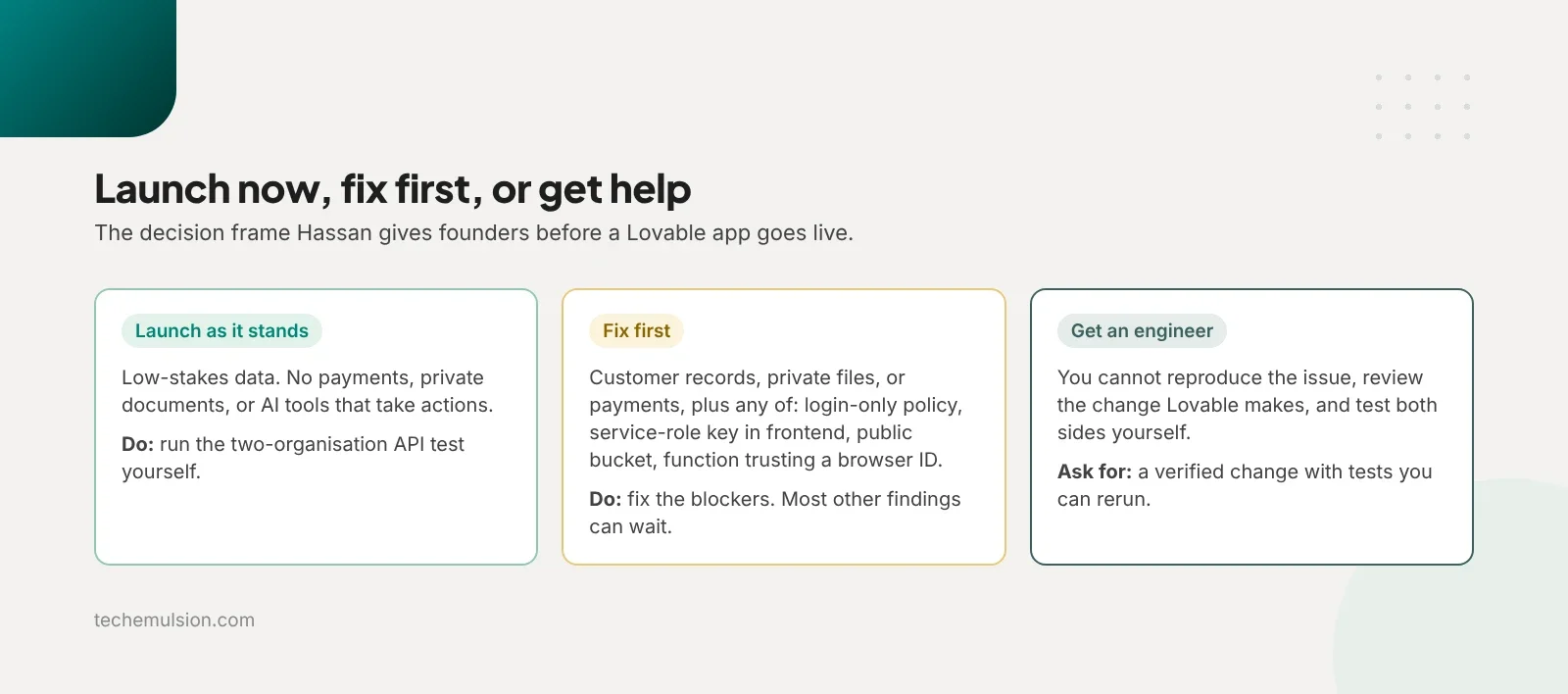
- Launch as it stands if the app holds low-stakes data, with no payments, private documents, or AI tools that take actions. Run the two-organisation API test yourself.
- Fix first if the app stores customer records, private files, or anything payment-related, and you found a policy that only checks login, a service-role key in the frontend, a public bucket with private files, or a function that trusts an ID from the browser. These are launch blockers. Most other findings can wait until after launch.
- Get an engineer if you cannot reproduce an issue, review the change Lovable makes, and test both the authorised and unauthorised behaviour yourself. That is where judgment adds value. Ask for a verified change with tests you can rerun.
My own position is that "ask Lovable to make it secure" is a fine starting point and a dangerous sign-off. The same tool that built the app can help fix it, and we use AI tools for this too. The failure is treating the AI's reply as proof.
"I've secured your database" is a sentence. A request showing that Company A cannot read Company B's records is evidence.
Most Lovable apps do not need a rebuild either. Rewriting a usable product wastes money when the real problems are permissions, exposed credentials, and a handful of backend functions. Audit first, then decide, the same way you would weigh whether to build or buy your AI agent.
FAQ: questions founders ask about Lovable and Supabase security
Lovable says RLS is enabled and the security checks passed. What else is there?
RLS being enabled is a starting point. The question is whether each policy enforces your business rules: can one customer read another's records, can a regular user run an admin action. An audit tests those boundaries and gives you evidence.
How do I test if users can see each other's data in Supabase?
Create two organisations with a user in each. Capture a normal request in browser DevTools, replay it in Postman or curl with the other user's token, and swap in the other organisation's record ID. Then check the database, since a quiet response does not prove nothing changed.
We only have 50 users. Can we do this after we get traction?
Ask what those 50 users are trusting you with. A prototype with synthetic data can wait. Customer documents or payment workflows already carry the responsibility, so scope the launch blockers now and let the rest wait.
Is the Supabase anon key safe in the frontend?
Yes. The public anon or publishable key is designed to be visible in a browser app, and RLS protects the data behind it. The service-role key bypasses RLS and must never ship to a browser, a Chrome extension, or a mobile app.
How long does a Lovable security audit take?
The portal engagement above took three working days for the audit, five for fixes, and two for regression testing and handover. A small app with a few tables is quicker. A multi-tenant platform with AI actions takes longer, because every route to sensitive data gets traced.
Can I just ask Lovable to fix the security issues for free?
You can, and it will often help with the implementation. The part that still needs attention is deciding whether the fix is correct and whether it broke something else, which means reproducing the issue and testing both sides.
How do you get your Lovable app audited before launch?
Tech Emulsion offers scoped Lovable and Supabase security audits, with a separate fixed quote for remediation and verification. Pricing depends on the application's size, permissions, integrations, and data sensitivity. The audit deliverable is a prioritised findings report with evidence, launch blockers, recommended fixes, and a remediation estimate. You can have us implement the fixes or take the report to another engineer.
If you need ongoing development after the hardening, an embedded engineer is a separate option. For a defined scope at a fixed price, a fixed-price project fits better.
Share what you have built with our software founders team: the app URL, stack, launch status, data stored, and your main concern. We will scope the review, quote it, and arrange secure access after the first call. You can also book a call with us directly. Everything else we do is at techemulsion.com.