HubSpot vs Salesforce vs Marketo: which one fits your client?
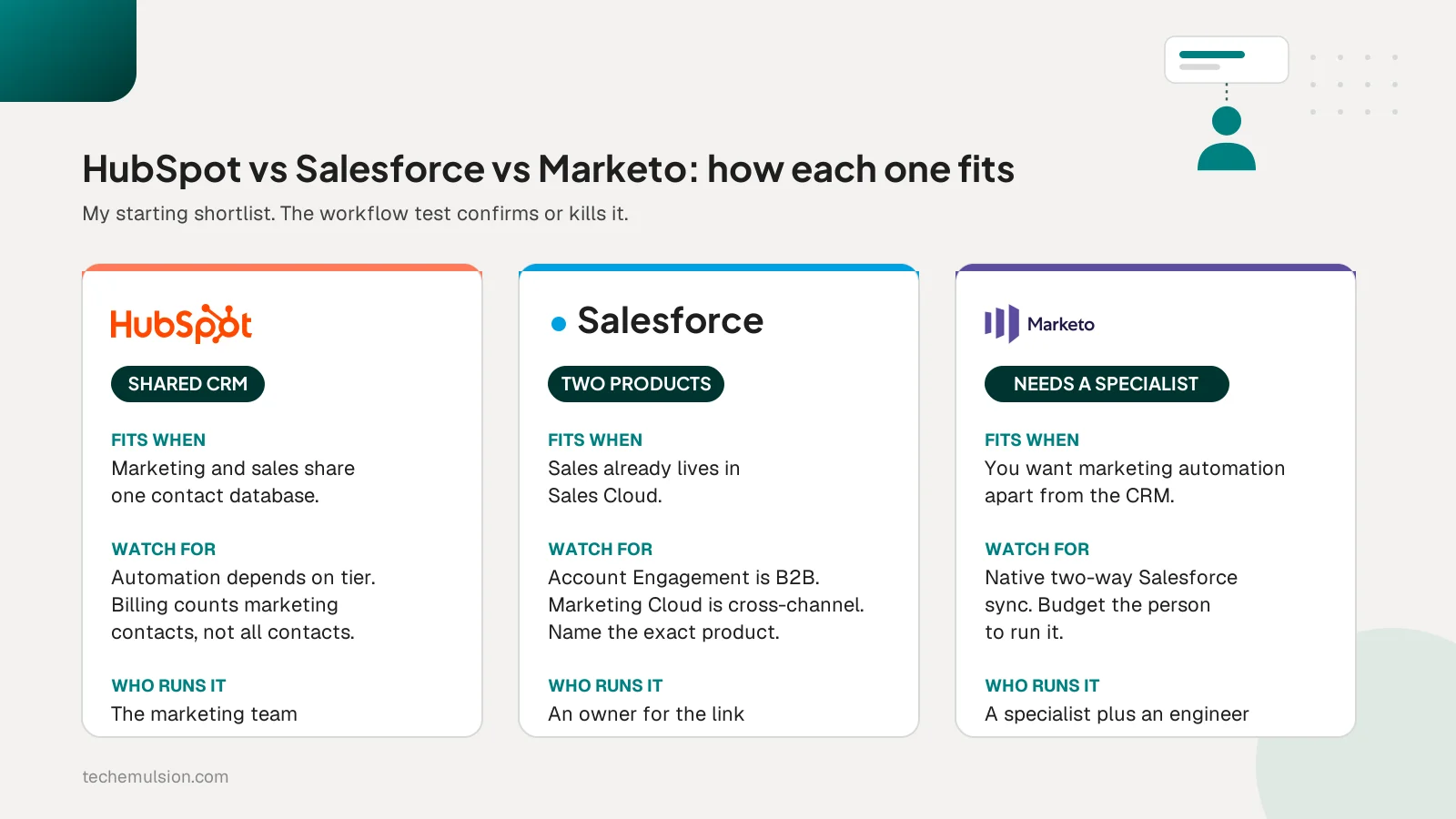
HubSpot fits a team that wants marketing and sales in one shared CRM. Salesforce Account Engagement fits a team whose sales process lives in Sales Cloud. Marketo fits a team that wants a dedicated platform beside its CRM and can fund a specialist to run it. Each choice also sets the staffing and maintenance you take on after launch.
That last sentence is the one most HubSpot vs Salesforce vs Marketo comparisons skip, and it is the one I care about most. I run Tech Emulsion, an AI automation agency. We implemented HubSpot for a US-based marketing agency in 2025 and connected Salesforce Sales Cloud with Marketing Cloud for a New York marketing agency in 2026. Marketo appears here as a technical assessment, since we have not shipped a Marketo build.
The reader I have in mind is an agency owner or marketing operations lead choosing a platform for a growing B2B client whose handoffs between marketing and sales have become messy. You need enough operating detail to defend the decision.
Why I compare the operating commitment alongside the features
If you have budgeted for the platform and the implementation but nobody to manage it afterward, your budget is incomplete. That is the opinion I give on every sales call.
Campaigns change, salespeople leave, qualification rules evolve, and connected systems change their APIs. A workflow can run successfully every day while following rules that no longer make sense.
So for each setup I ask three questions. What expertise does this configuration need? What can the marketing team manage on their own? What needs an engineer or a platform specialist?
The right platform is the one the client can afford to own properly, including the people who keep it useful. That is how we run AI automation for marketing agencies, with the maintenance plan written into the scope from day one.
How the three platforms differ in practice
HubSpot
HubSpot puts marketing, sales, and the contact database in one environment, so the lifecycle stage a marketer sets is the same field a sales rep sees. Native workflows handle owner assignment, task creation, and stage updates well, and the people operating the platform can read them without an engineer.
Two things to check before you commit. The automation tools available depend on the subscription tier. And HubSpot bills on marketing contacts: contacts set as non-marketing do not count toward the paid contact tier, while a contact set as marketing counts even if you never email them. Total database size and billable marketing contacts are different inputs.
Salesforce Account Engagement and Marketing Cloud Engagement
"We need Salesforce marketing" is never specific enough to quote, because Salesforce sells two different products here. Account Engagement, formerly Pardot, is the B2B marketing automation product inside the Salesforce environment that handles lead scoring, nurturing, and sales alignment. Marketing Cloud Engagement is built for cross-channel customer journeys.
On our New York engagement, most of the effort went into the connection between Sales Cloud and Marketing Cloud rather than either product on its own. That connection is where field ownership, record matching, and journey exit logic get decided, and none of it comes configured.
Marketo
Adobe Marketo Engage is a dedicated marketing automation platform that connects to a separate CRM. Its native Salesforce sync is bidirectional and covers leads, contacts, accounts, opportunities, and custom objects, so a Salesforce shop does not have to buy Salesforce's marketing products to get marketing automation. My assessment is that Marketo belongs on the shortlist when the client wants that separation and can fund the expertise to run it.
What the HubSpot migration taught Tech Emulsion
In 2025 Tech Emulsion handled a HubSpot migration, native workflows, and lead scoring for a US-based marketing agency. Results from this engagement are not published, so I will describe the build and the lesson.
We had to decide how to handle duplicate contacts, inconsistent lifecycle stages, missing owners, and historical records. Subscription and suppression data needed its own mapping, so importing a contact did not make that person eligible for marketing.
For lead scoring we separated fit from engagement. Native workflows handled owner assignment, follow-up tasks, and lifecycle updates.
The lesson: migration, lead scoring, and follow-up automation have to be designed together. A scoring model depends on consistent data, and a qualified lead still needs an owner and a clear next action. Our lead capture and qualification work now starts with that joint design.
What connecting Sales Cloud and Marketing Cloud taught us
In 2026 Tech Emulsion worked with a New York marketing agency on the sales process in Salesforce Sales Cloud and its connection to Marketing Cloud. Sales Cloud covered lead assignment, opportunity stages, and field mapping. Marketing Cloud covered segmentation and nurture journeys that respond to sales status. Results are not published for this engagement either.
The most important design decision was field ownership. We defined which system could update each shared field and how conflicting updates would be resolved. Without that agreement, connecting two platforms just moves inconsistent data around faster.
The integration scope included record matching, failed-update logging, controlled retries, and reconciliation, plus the cases that break naive syncs: reassigned leads, converted records, and prospects who should leave a nurture journey the moment a sales conversation starts.
Three mistakes I have seen agencies make
These come from real engagements. The costs stay qualitative because I have not verified a dollar figure for any of them.
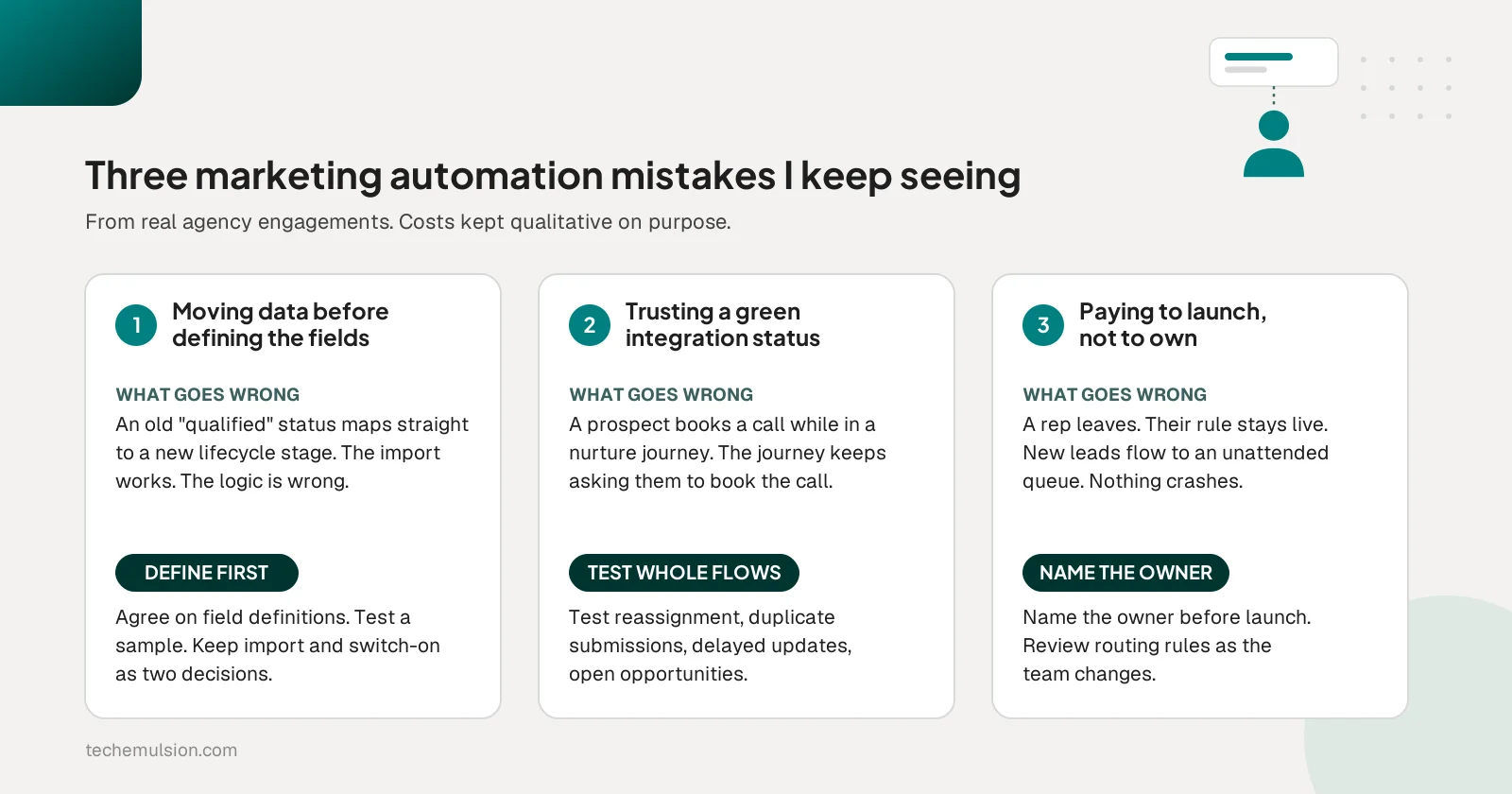
The first is moving the data before deciding what the fields mean. An agency maps its old "qualified" status straight to a new lifecycle stage, but the old field held everyone from a guide download to a sales-qualified lead. Agree on field definitions first, test a sample, and keep import completion and workflow activation as two separate decisions.
The second is treating a successful Salesforce integration as proof that the handoff works. A prospect books a call while sitting in a nurture journey, the exit logic ignores the change, and marketing keeps asking them to book the call they already booked. An unassigned lead is worse: nobody follows up. Test complete scenarios, including reassignment, duplicate submissions, and delayed updates.
The third is paying for implementation without assigning ownership afterward. A salesperson leaves, their assignment rule stays active, and new leads keep flowing to an unattended queue. Nothing crashes. The cost is the delay before anyone notices plus the work of restarting those conversations.
My process for choosing between HubSpot, Salesforce, and Marketo
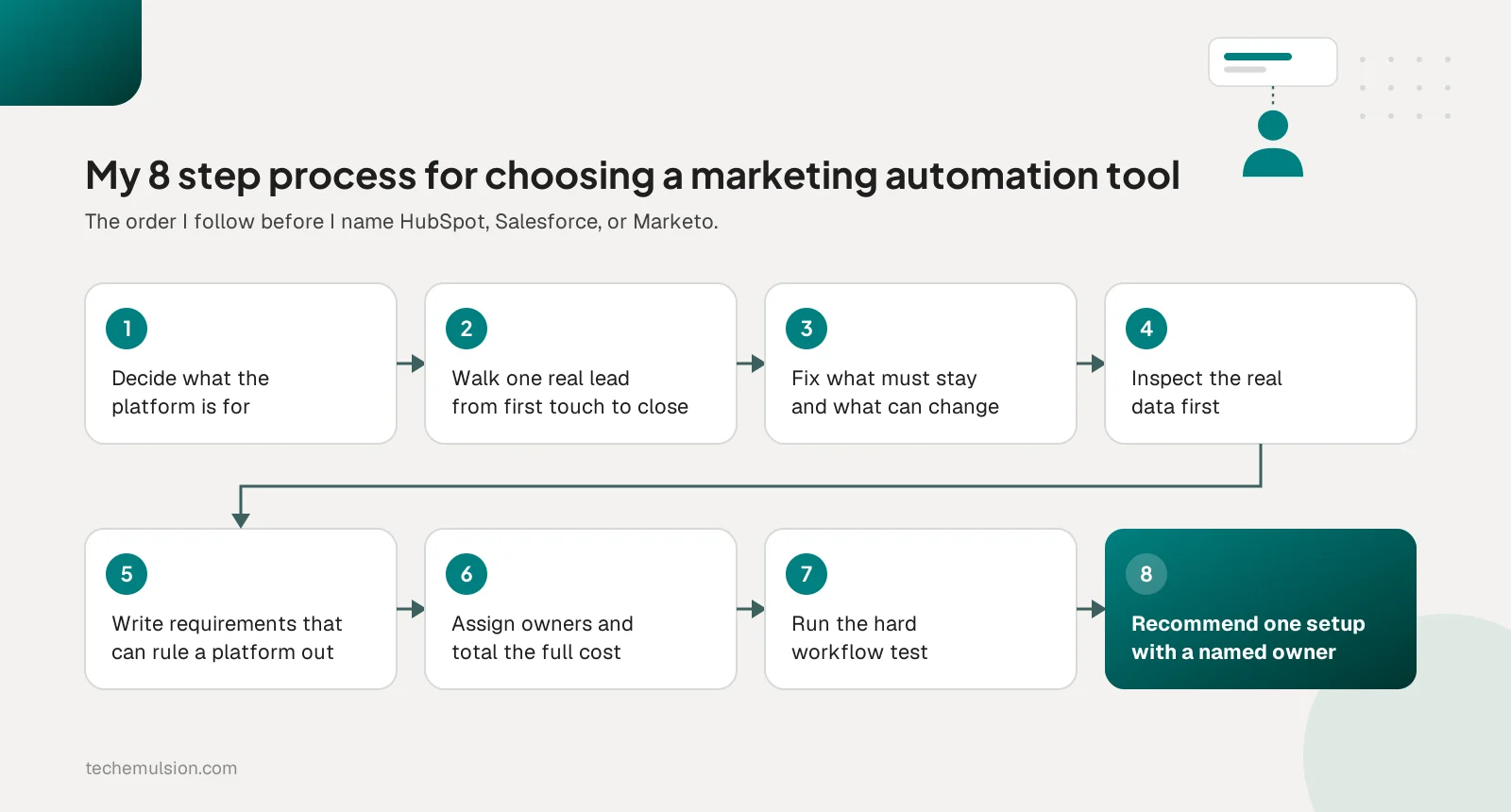
This is the order I follow when a client asks which one to pick.
- Establish what the platform is for: the agency's own marketing, one client, or a service delivered across several clients. Then ask what is broken today.
- Walk one real lead through its complete journey, from first contact to won or lost. Turn that into explicit rules and exceptions.
- Identify what must stay and what can change. Keeping Salesforce CRM does not force you to buy Salesforce's marketing products.
- Inspect the data before trusting the requirements. Review a sample for duplicates, missing owners, inconsistent stages, and consent records, and agree on which system owns each shared field. This tells you whether you are pricing an implementation or a data cleanup project as well.
- Define the requirements that can eliminate a platform. Separate launch needs from future wishes, name the exact Salesforce product, and for each requirement ask whether it must be native, whether an integration can handle it, and who maintains that integration.
- Assign operating responsibilities and calculate the full cost over the same period, with the exact edition and usage assumptions.
- Make the shortlisted platforms prove the difficult workflow. Give each vendor the same scenario and watch the proposed operator make a routine change.
- Recommend a specific setup with a named owner: product, edition, implementation scope, ongoing owner, expected operating cost, and the tradeoffs the client is accepting.
My starting shortlist from step 8 is a hypothesis the workflow test confirms or kills:
- HubSpot first when the client wants marketing and sales in a shared CRM and the required workflows fit the proposed edition.
- Salesforce Account Engagement first when Salesforce is central to sales and the main need is B2B qualification, nurturing, and sales alignment.
- Salesforce Marketing Cloud Engagement first when cross-channel journeys are a core requirement.
- Marketo first when the client wants a dedicated marketing automation platform beside its CRM and can fund the expertise to manage it.
What the total cost looks like beyond the subscription
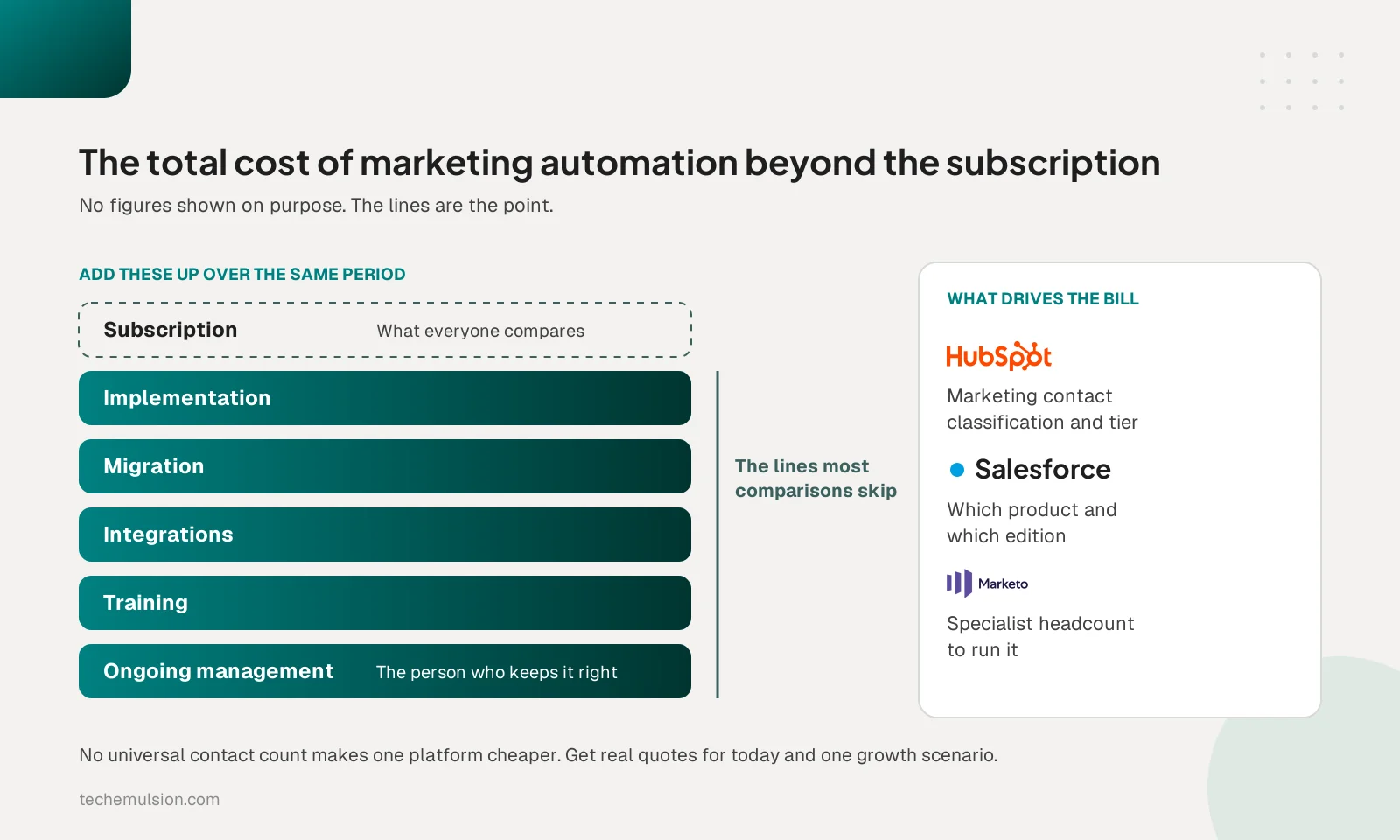
The subscription is the line everyone compares and the one that matters least on its own. I add implementation, migration, integrations, training, and ongoing management, all over the same planning period. I wrote separately about what AI automation costs for marketing agencies, and the same logic applies here.
I refuse to declare a universal contact count where one platform becomes cheaper, because the variable that drives the bill differs: marketing contact classification on HubSpot, product and edition on Salesforce, specialist headcount on Marketo. When a prospect says HubSpot gets expensive as they grow, I ask which specific requirement is getting expensive, then price the current need and one realistic growth scenario with actual vendor quotes. A platform change still has to solve a defined problem.
Who owns the platform after launch
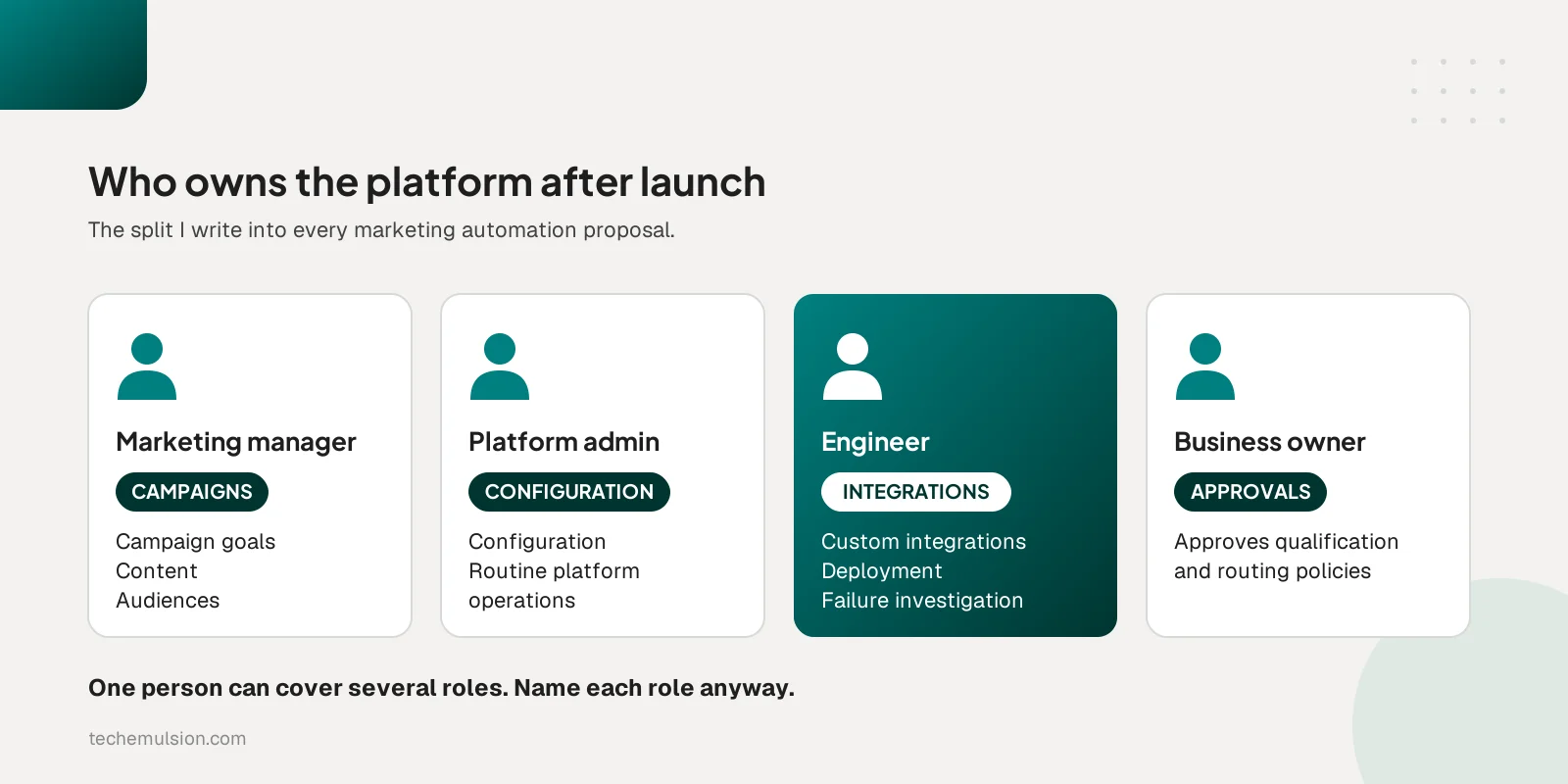
"Budget for a specialist" is advice most comparison posts give, and it needs a real division of responsibilities to mean anything. This is the split I write into every proposal.
- The marketing manager owns campaign goals, content, and audiences.
- The platform administrator owns configuration and routine platform operations.
- The engineer owns custom integrations, deployment, and technical failure investigation.
- The client's business owner approves qualification and routing policies.
One person can cover several roles. Calling everyone "the engineer" hides the differences.
This is also my answer when a prospect asks why a no-code platform needs a retained engineer. The engineer owns the technical work we agree needs ongoing support: monitoring integrations, investigating duplicate records, expired credentials, and conflicting updates, and maintaining custom code. That is the model behind our dedicated team engagements, where the client keeps ownership and we supply the person.
The one workflow test every shortlisted platform must pass
Here is the scenario I give every vendor. An existing contact submits a form twice, already has an open opportunity, changes territory, and opts out before a scheduled message goes out. For each step, show me the expected record, the owner, the suppression behavior, and the trail someone would follow to investigate. Then tell me what happens if an update times out.
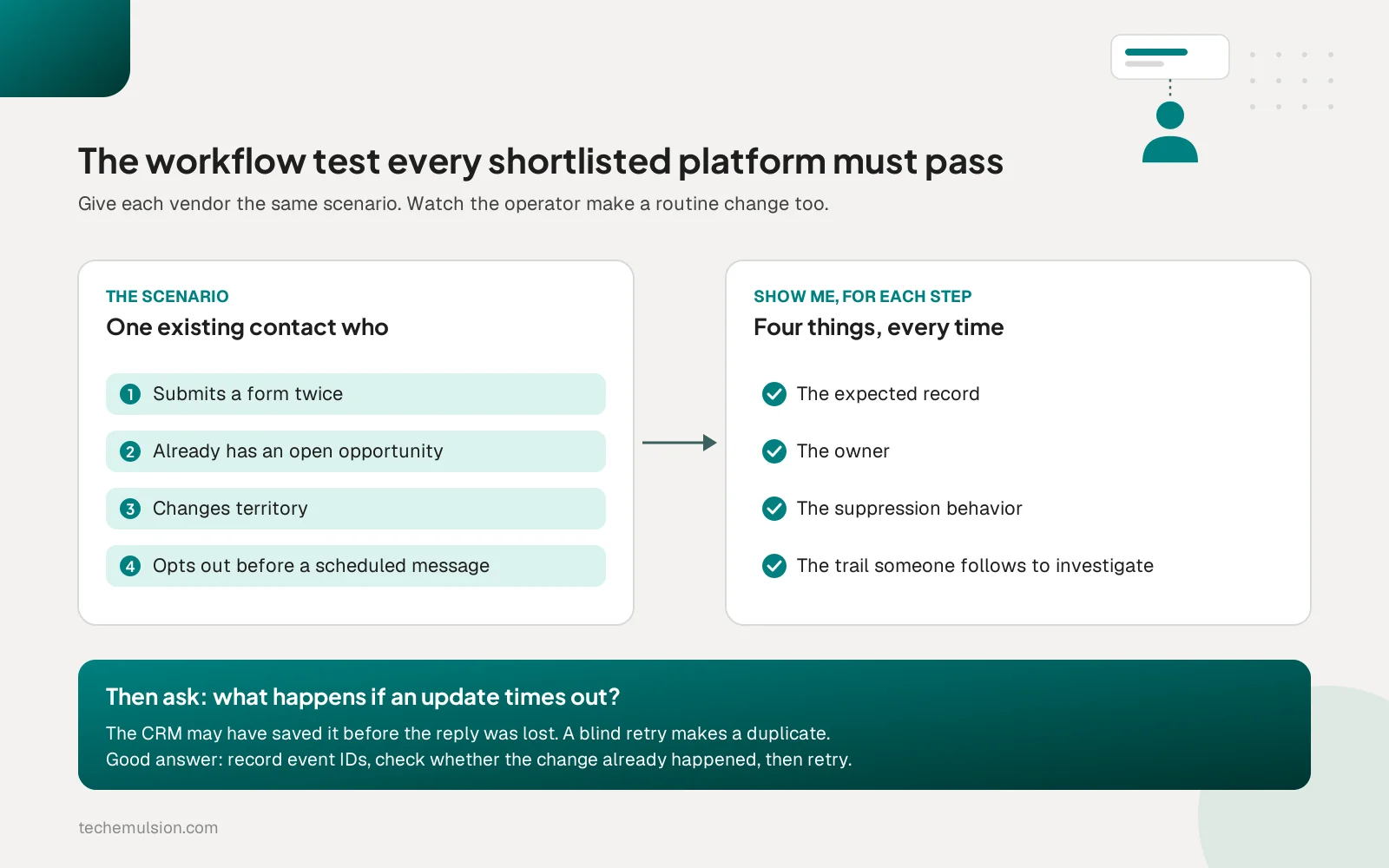
A timeout is the part most demos skip. The CRM may have accepted the update before the response was lost, and retrying a create operation blindly produces a duplicate. The answer I want to hear is that the integration records event identifiers and destination record IDs, and checks whether the intended change already happened before repeating an uncertain operation. The people who build and maintain the connection matter more to this test than the platform, which is why I keep coming back to ownership as the missing layer in production AI.
How Tech Emulsion builds around these platforms
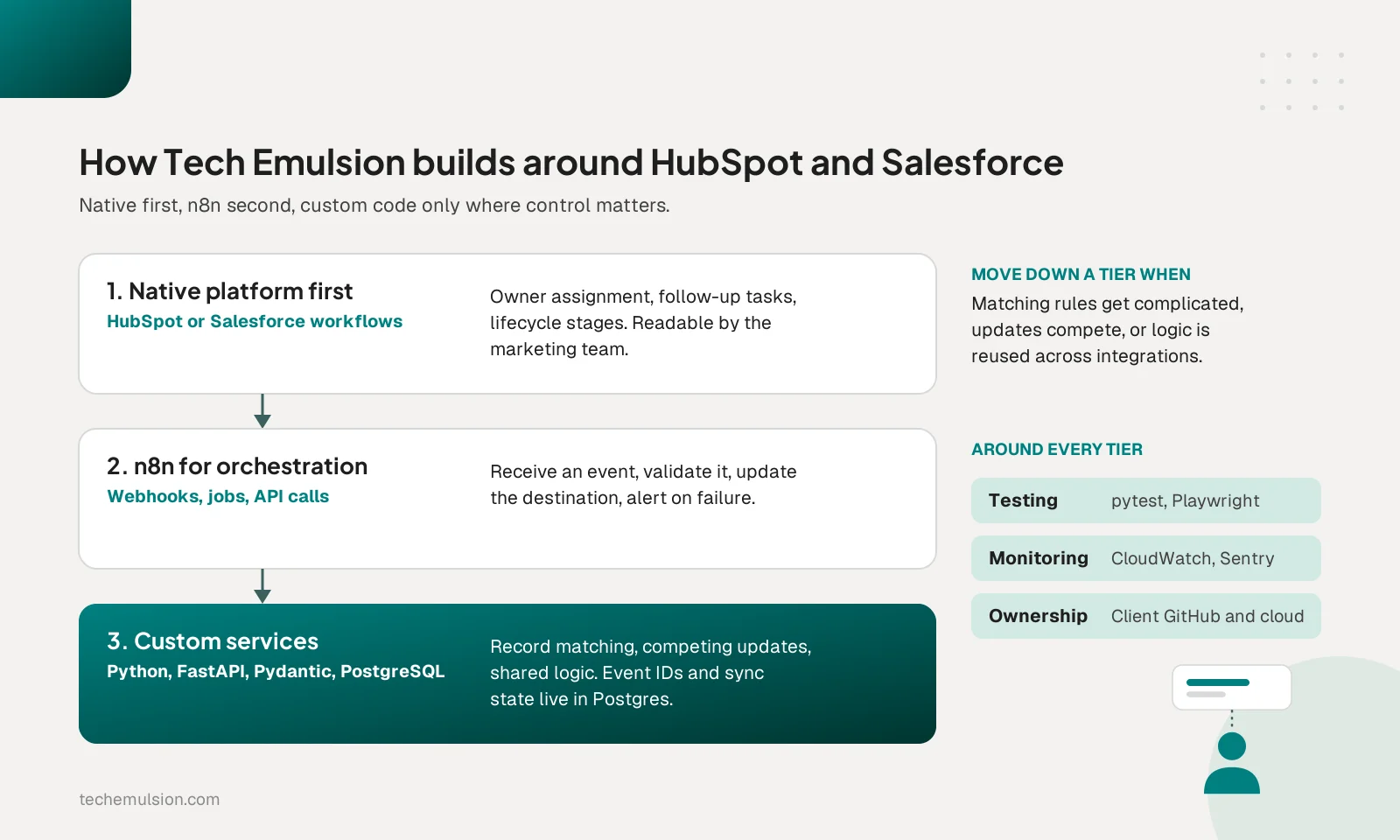
Our rule at Tech Emulsion is native platform features first, n8n for orchestration, and custom services where the integration needs tighter control. We do not install the full stack on every engagement.
- n8n coordinates webhooks, scheduled jobs, API calls, and notifications in a workflow the maintenance engineer can inspect.
- Python, FastAPI, and Pydantic hold complex validation, data mapping, and record matching in version-controlled, testable code.
- PostgreSQL tracks source IDs, destination IDs, processed events, sync checkpoints, and failed jobs.
- pytest and Playwright test business rules and API behavior separately from forms and browser interactions.
- Structured logs, AWS CloudWatch, and Sentry make failures traceable, and client-owned GitHub repositories and cloud accounts hold the code, configuration, and runbook.
Lead scoring and routing do not automatically need AI. Territory, company size, and explicit engagement rules belong in deterministic logic, and when AI interprets an open-text inquiry, code still validates that output before it influences a downstream action. I covered the decision between a subscription tool and a custom agent in whether to build or buy your AI marketing agent, and the same test applies here.
What agencies should know about delivering this across clients
An agency owner often has to implement and maintain different platforms across several clients. The questions that matter are repeatable templates, client-specific exceptions, access separation, documentation, support scope, and offboarding.
Standardizing delivery helps when client workflows share a template. Forcing every client onto one platform creates work when their sales processes differ, especially for SaaS companies with product-led signals a services client never produces. If a client also asks how results will be shown back to them, automated client reporting belongs in the same scope conversation, because the field definitions you agree on in step 4 are the ones the reports will depend on.
Frequently asked questions about HubSpot, Salesforce, and Marketo
What is the difference between Salesforce Account Engagement and Marketing Cloud Engagement?
Account Engagement, formerly Pardot, is the B2B marketing automation product focused on lead scoring, nurturing, and sales alignment inside Salesforce. Marketing Cloud Engagement is built for cross-channel customer journeys. Name the specific product in every requirement and quote.
Does Marketo work with Salesforce?
Yes. Marketo Engage has a native bidirectional sync with Salesforce that covers leads, contacts, accounts, opportunities, and custom objects. The staffing cost of a dedicated platform is the main tradeoff.
Can a marketing manager run HubSpot or Salesforce without an engineer?
For campaigns, content, and audiences, yes. Investigating duplicate records, expired integration credentials, and conflicting updates between systems is different work. If several business-critical systems depend on the integration, someone needs explicit responsibility for it.
How does HubSpot pricing change as the contact database grows?
HubSpot bills on marketing contacts. Contacts set as non-marketing do not count toward the paid tier, while a contact set as marketing counts even if you never email them. Manage that classification deliberately and price the exact edition you need.
Next step: decide who owns the system before you buy it
If you are choosing between these platforms for a client right now, write down who will own the platform after launch before you sign anything. If that person does not exist yet, our forward deployed engineering engagement puts an embedded engineer on your team from $15 per hour, full-time at 40 hours a week ($600 per week, about $2,600 per month) or part-time. It includes architect and PM oversight, a dedicated Slack channel, a Loom demo every Friday, full code ownership, a replacement engineer within three days, and a first-week refund guarantee, on a two-month minimum with 30 days' notice.
Pricing is current as of October 2026. The engineer builds the implementation and stays to keep it working. Book an intro call and bring the client you are deciding for.