What marketing tasks can AI agents fully automate?
AI agents can fully automate marketing tasks with clear inputs, a defined finish line, and a cheap-to-correct failure: compiling weekly reports, flagging unanswered leads, creating internal tasks, assembling account summaries, and sending templated messages like booking reminders. Decisions that touch money, spend, pricing, or a client relationship still stop for a person.
I have spent the last year building and maintaining five AI employees for a Clovis-based marketing agency that serves HVAC companies, plumbers, body shops, real estate offices, salons, restaurants, and nonprofits. The agency had about 30 client accounts after its first eight months. Over the following 12 months of working with Tech Emulsion, it grew to around 80 to 100 accounts. That growth reflects the agency's overall work, and I would not credit it entirely to AI. It does show something useful: an agency can add autonomous workflows while keeping its delivery team and a client-facing Operations Manager in charge of the decisions that matter.
This post lists which tasks ran end to end with no human touching them, which ones always waited for approval, one failure that changed our rules, and the process I use on calls to pick the first workflow. If you run a small or midsize marketing agency and already use AI for writing, this is the next question to answer before you hire again.
Why "can AI fully automate marketing" is the wrong question
The question is too broad to act on. You have to define where the task ends.
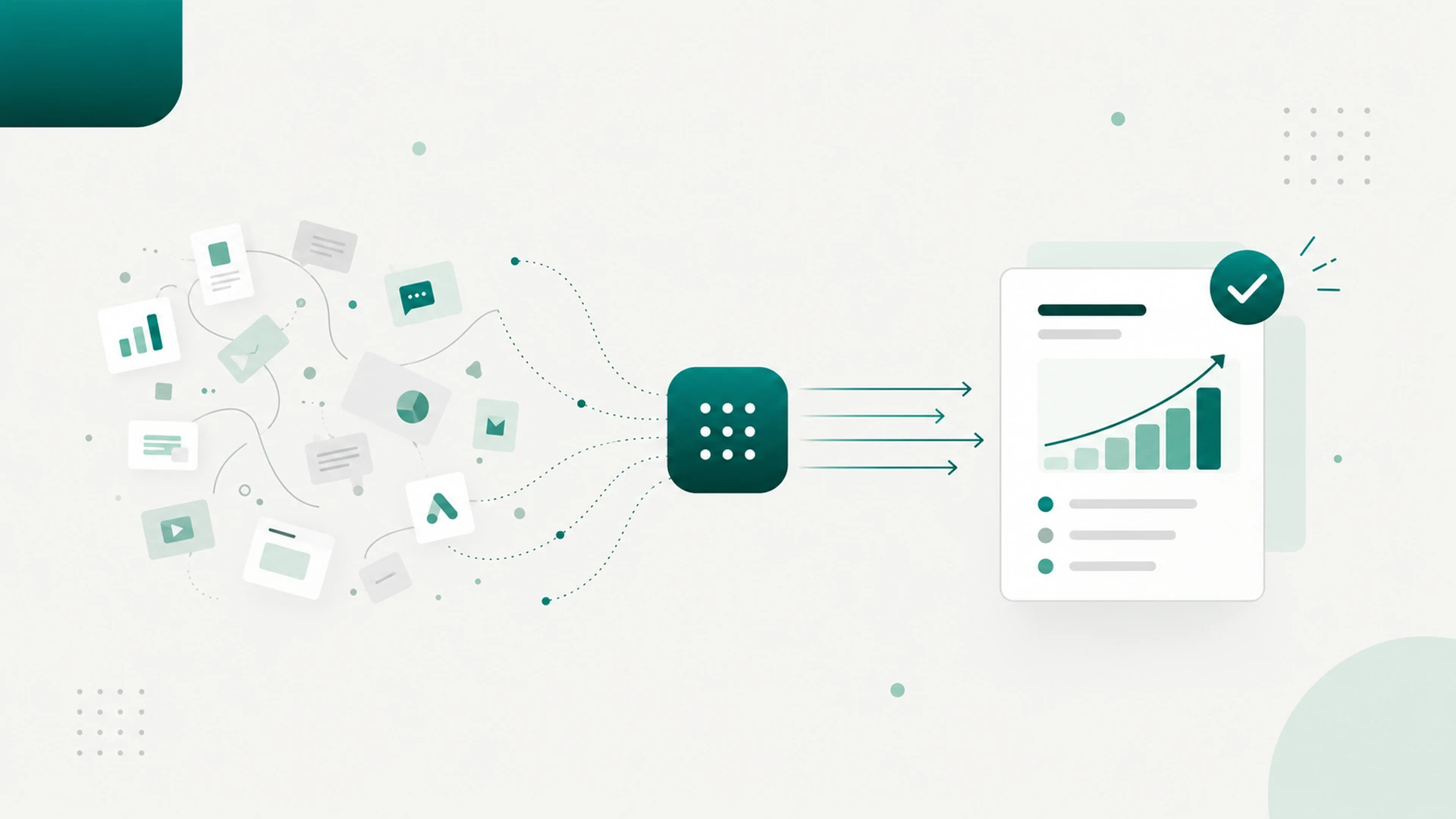
Our AI Reporting Assistant could collect data from the CRM, call logs, SEO and GEO trackers, paid ads, and the website, calculate week-over-week comparisons, compile a report, and post it to the client's ClickUp project with nobody touching it. That task was fully automated. Explaining disappointing results to the client, recommending a strategy change, and committing to next steps still belonged to a person.
Most automation lists skip that boundary. "Automates reporting" can mean anything from producing a draft to sending a client an explanation nobody checked. When I evaluate an AI employee, I count how much work it reliably finishes inside its boundary, including the time people spend reviewing and fixing its output. That is the number that decides whether it paid for itself. I covered the economics side of that evaluation in a separate post on whether AI agents can really replace your marketing team.
The five AI employees we built, and what each one ran on its own
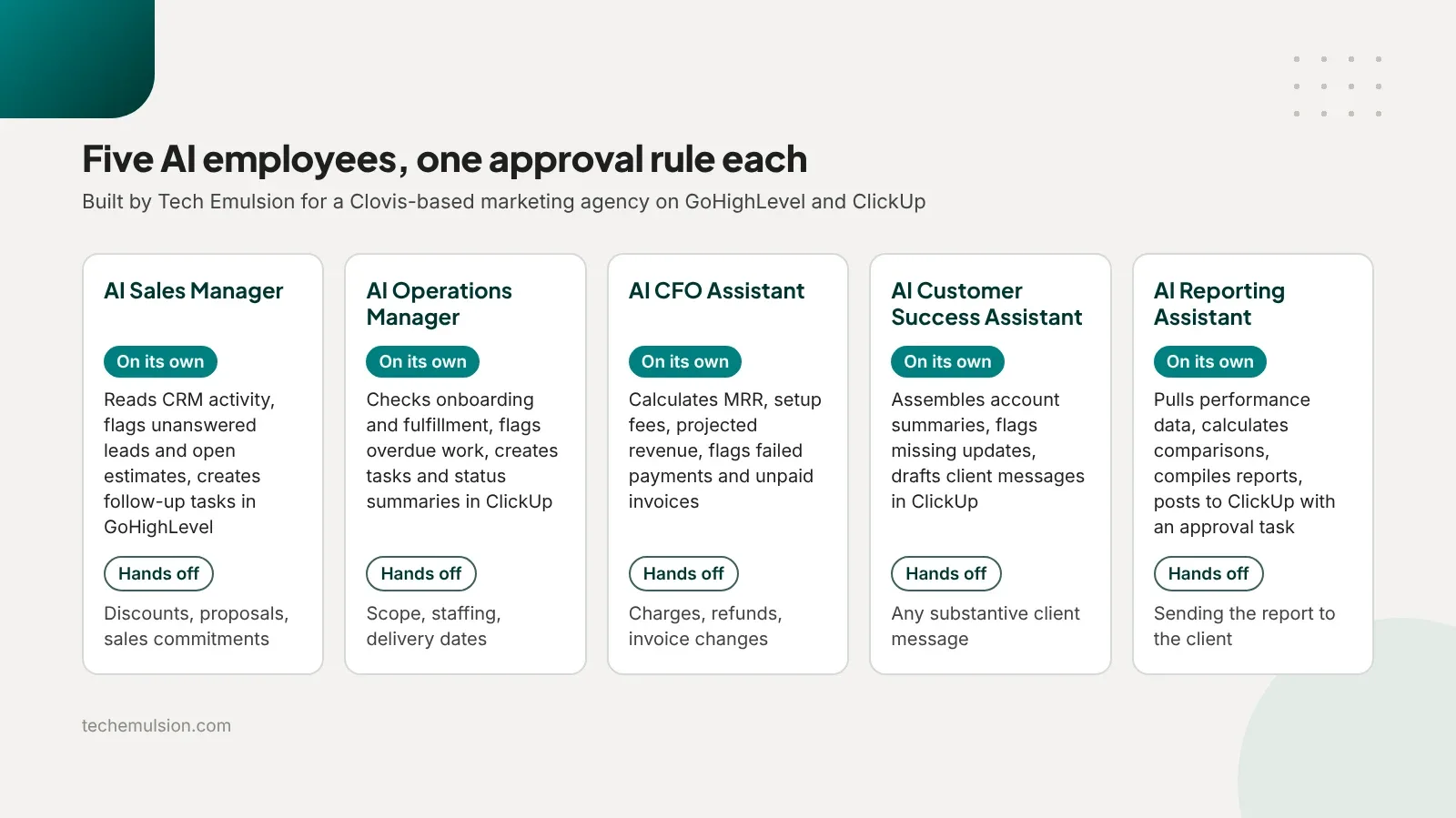
The agency already had a delivery team handling websites, SEO, GEO, Google and Meta ads, onboarding, reporting, and client communication. Their stack was GoHighLevel, ClickUp, Lovable websites, and Manus AI. They wanted a recurring-revenue division that sold AI employees working inside the systems their clients already used. Tech Emulsion built five.
Each one could finish routine internal work without approval. Each one stopped before anything consequential.
- AI Sales Manager. Read CRM activity, identified unanswered leads and open estimates, created routine follow-up tasks and notes in GoHighLevel, and posted internal sales summaries and escalations to ClickUp. It could not negotiate a discount or send a proposal.
- AI Operations Manager. Checked onboarding and fulfillment progress, flagged overdue work and bottlenecks, and created internal tasks, reminders, and status summaries in ClickUp. Changes to scope, staffing, or delivery dates waited for the responsible lead.
- AI CFO Assistant. Read payment and subscription data, calculated MRR, setup fees, and projected revenue, and flagged failed payments and unpaid invoices. Outputs landed in a restricted ClickUp space linked to the underlying records. It could not change an invoice, issue a refund, or charge anyone.
- AI Customer Success Assistant. Assembled account summaries, flagged missing updates, and prepared client health summaries and draft messages inside each client's ClickUp project. Any substantive message to a client waited for the Client Operations Manager.
- AI Reporting Assistant. Pulled performance data, calculated comparisons, compiled weekly and monthly reports, and posted them to the client's ClickUp project with an approval task attached. Sending the report to the client required that approval.
Routine external messages also ran on their own, inside existing GoHighLevel workflows: inquiry acknowledgments, missed-call responses, booking confirmations and reminders, missing-information requests, review requests, and short follow-up sequences. Every one of those used an approved template and a trigger, with stop conditions for replies, bookings, and opt-outs. This is the same pattern we use for lead capture and qualification for agencies on other engagements.
Which marketing tasks always stopped for a human?
The approval list was short and specific. We wrote it down before building anything.
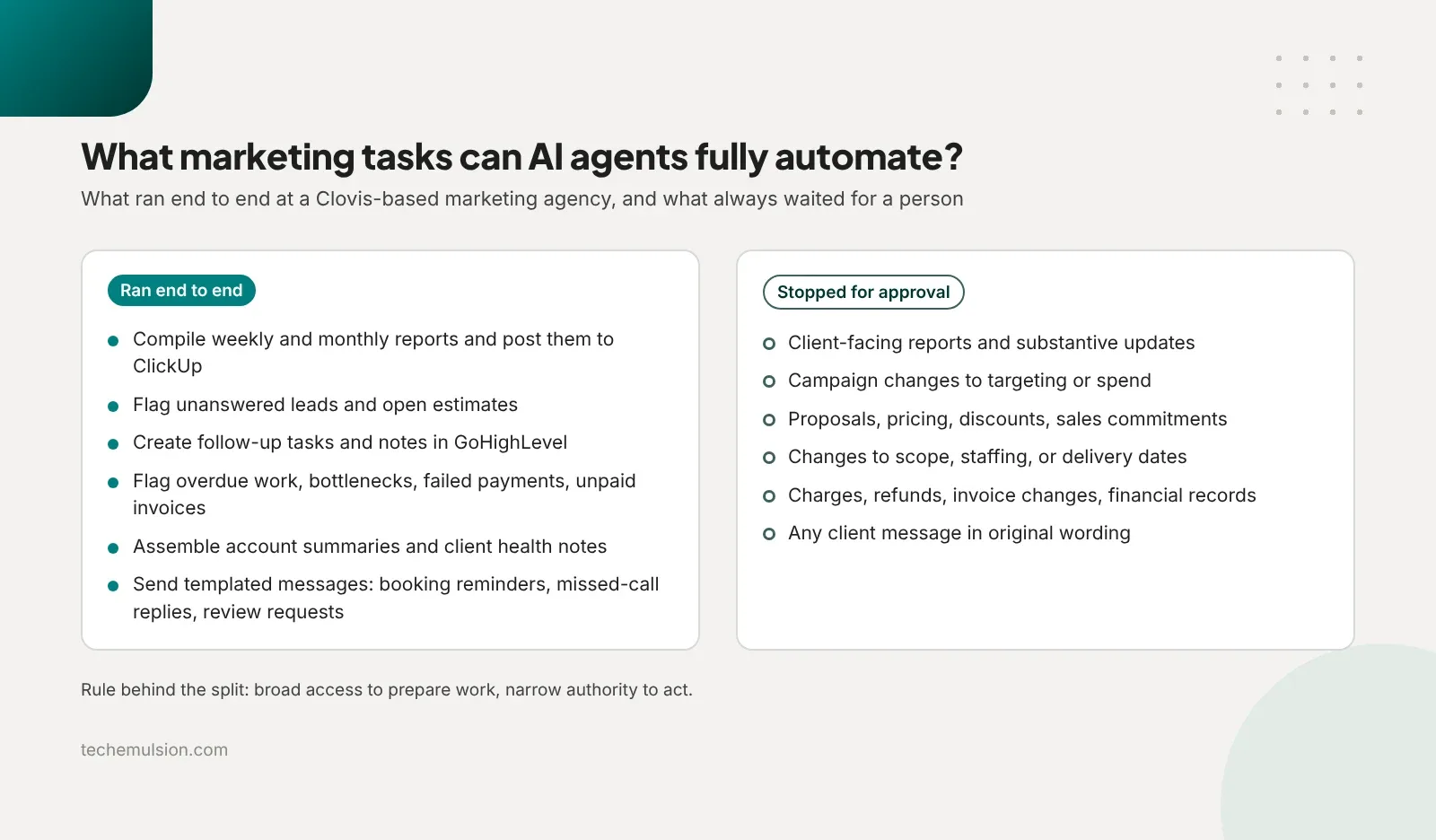
- Client-facing reports and substantive updates waited for the Client Operations Manager, with specialist review when needed.
- Campaign changes affecting targeting or spend waited for the paid-media lead, with client approval for anything outside agreed authority.
- Proposals, pricing, discounts, and sales commitments waited for the agency owner or a designated sales lead.
- Changes to scope, staffing, or delivery dates waited for the project or fulfillment lead.
- Charges, refunds, invoice changes, and financial-record updates waited for the authorized finance person or the business owner.
The rule behind all five lines is the same: broad access to prepare work, narrow authority to act. Anything that spends money, changes a live client system, or communicates externally with original wording needs a named human to say yes. If a boundary cannot be enforced in the account permissions, the account does not get connected.
The failure that changed our rules
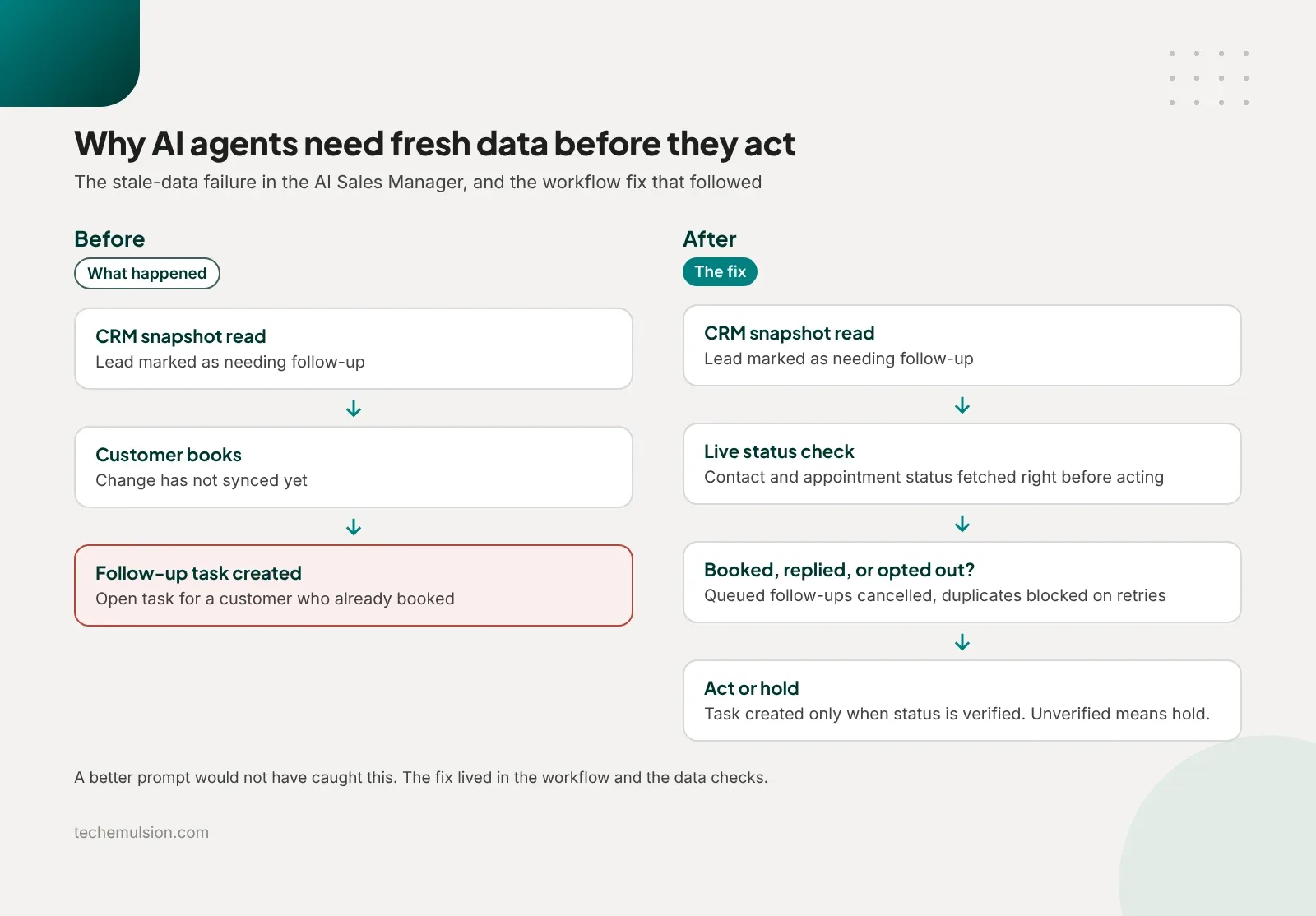
The AI Sales Manager once created a follow-up task for a customer who had already booked.
It had identified the lead as needing follow-up based on an earlier CRM snapshot. The customer then booked an appointment. Before that change synced, the assistant created a follow-up task in GoHighLevel. The team spotted it because the same contact had a confirmed booking and an open follow-up task sitting side by side. We caught it at the task stage. The real risk was a reminder going out that made the business look unaware of its own customer's booking.
A better prompt or a smarter model would not have fixed this. The fix was in the workflow:
- Check the live contact and appointment status immediately before creating a task or sending a message.
- Cancel queued follow-ups when someone replies, books, or opts out.
- Prevent duplicate actions on retries.
- If the system cannot verify current status, hold the action.
An agent can use a snapshot to find work. It needs fresh data before it acts. That one incident is why I now believe the real work in full automation is defining when the system should stop: on completed work, on missing information, on stale data, and on decisions outside its authority. I wrote more about that operational layer in a post on AI ops and ownership.
How I pick the first marketing task to automate
My rule for a first workflow: pick something frequent, measurable, with clear inputs, a clear finish line, and a cheap-to-correct failure. On a discovery call I run the same process every time.
Ask for the last real example
I ask the owner to walk me through the last time someone on the team did the task. What triggered it, which systems did they open, what decisions did they make, and where did the output go. That surfaces missing steps and exceptions far faster than asking "What would you like AI to automate?"
Check eight things
- Frequency and volume. Daily or weekly, across enough accounts to justify setup.
- Actual effort. Hands-on time per run, measured separately from waiting time.
- Data access and freshness. Accessible systems, consistent identifiers, and a way to verify current status before acting.
- Process consistency. Different team members follow roughly the same steps, with a manageable number of exceptions.
- Judgment required. The owner can describe what a correct result looks like, with examples.
- Cost of being wrong. Errors are detectable and reversible, with approval before anything consequential.
- Ownership. One named person handles exceptions and approvals and has time to respond.
- Measurable value. Time, errors, completion speed, or missed follow-ups can be compared before and after.
Apply three gates
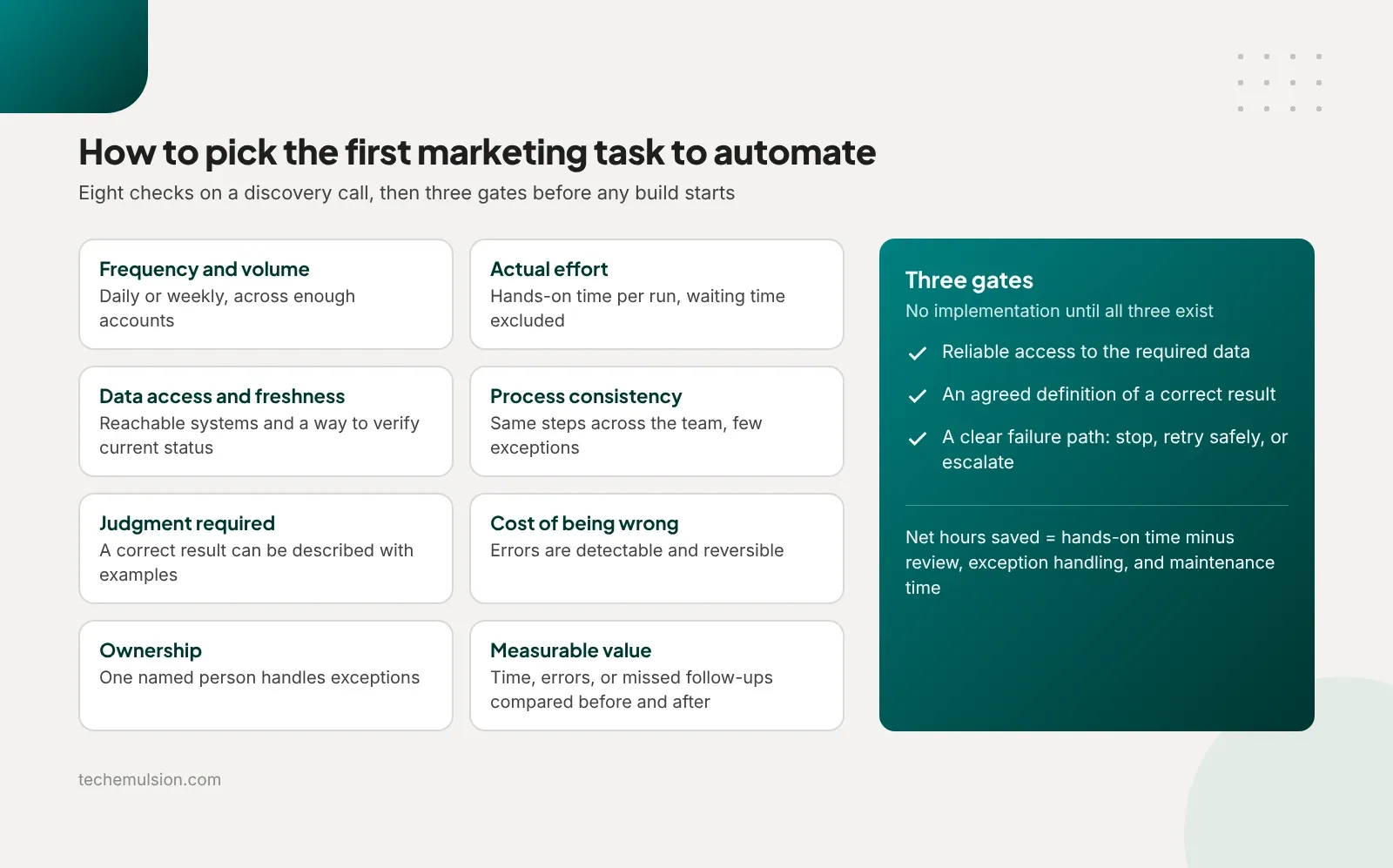
I will not start implementation until three things exist: reliable access to the required data, an agreed definition of a correct result, and a clear failure path (stop, retry safely, or escalate to a named person). If any of those is missing, the first job is fixing the process or the data access.
For the candidates that pass, the comparison is simple. Net hours saved equals current hands-on time minus the review, exception handling, and maintenance time the automation adds. Weigh that against setup and running cost. A workflow that creates hours of checking and cleanup delivers very little.
Pick one bounded workflow and pilot it
For an agency like the Clovis one, my default first candidate is: every week, collect the agreed metrics, compile a draft report, and post it to the correct client's ClickUp project for review. It has a schedule, a visible output, and an approval boundary. The Operations Manager can inspect it before it reaches the client. That is the shape of our automated reporting for agencies work, and it is far easier to validate than autonomous budget changes or customer negotiations.
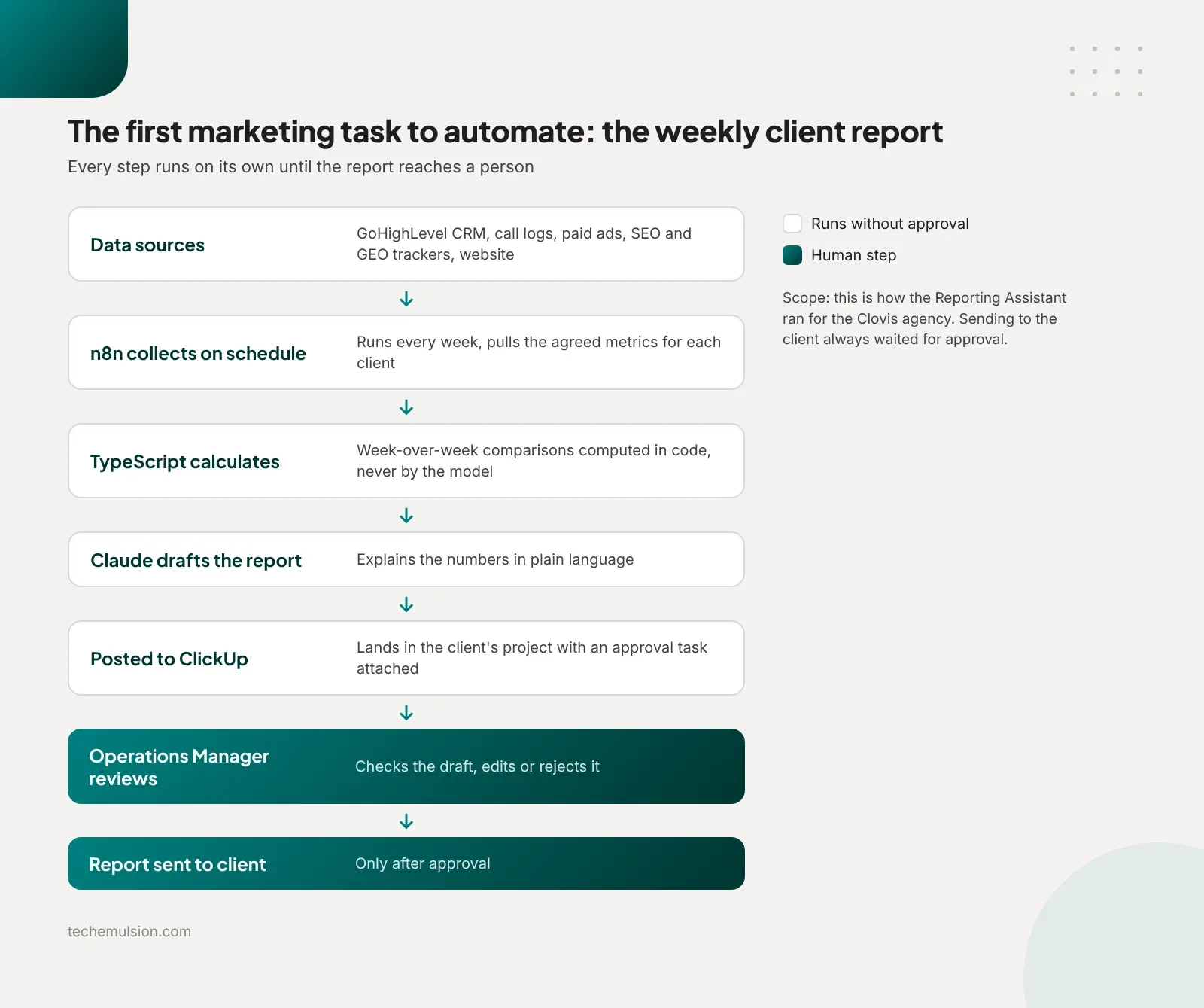
I pilot on two or three representative accounts, including one with messy data, and record total human time including corrections, missing or incorrect information, failed runs and duplicate actions, and whether the output arrived in the right place on time. We agree on acceptance criteria before expanding. For anything consequential, we explicitly test stale data, retries, and stop conditions.
The stack behind the five AI employees
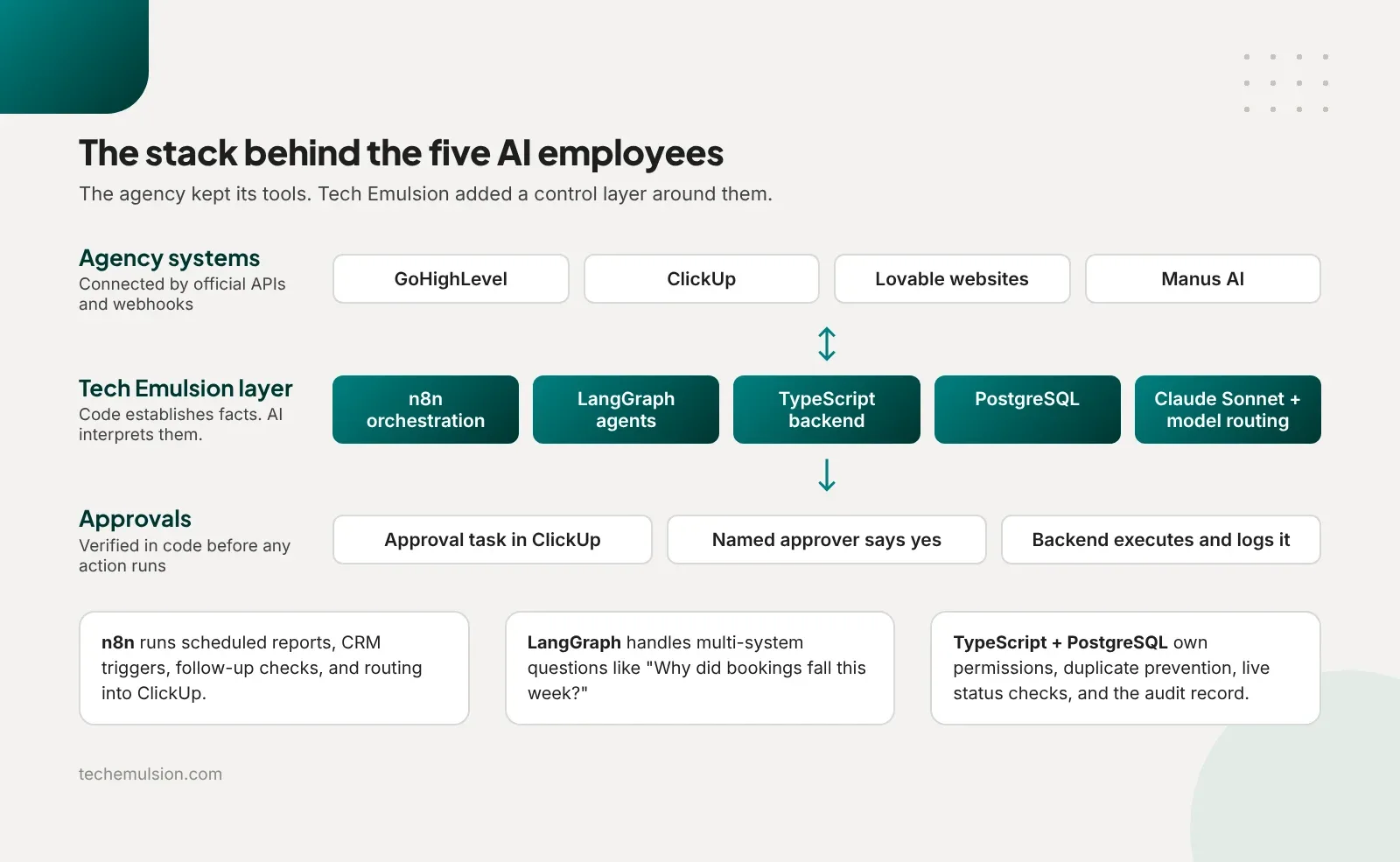
On Tech Emulsion's side, the Clovis build ran on n8n for orchestration, LangGraph for the more complex agent workflows, Claude Sonnet for reasoning, summaries, and drafting, a TypeScript backend for integrations and action controls, and PostgreSQL for durable records. We later added model routing across providers so simpler classification and extraction jobs could run on smaller models.
n8n handled the predictable sequences: scheduled reports, CRM event triggers, follow-up checks, overdue task sweeps, and routing updates into ClickUp. LangGraph handled questions like "Why did bookings fall this week?", where the assistant had to compare lead volume, response times, missed calls, and appointment outcomes across several systems and keep track of its steps before answering. I would not introduce that complexity for a weekly report.
Two design rules shaped everything. First, code establishes facts and AI interprets them. Financial figures, comparisons, and permission checks were calculated in TypeScript; Claude explained the results. Second, the backend owned every consequential action. It verified the ClickUp approval before executing, kept an audit record, prevented duplicates, and re-checked live status. If a proposed action changed after approval, it needed approval again. This is the same agentic AI engineering approach we apply on every build.
GoHighLevel and ClickUp connected via their official APIs and webhooks. Native n8n connectors covered the common calls, and direct API integrations filled the gaps. All five AI employees shared one foundation with separate tools, permissions, and context per client, so client separation was real.
Where this approach does not fit
Full automation is the wrong goal for a few kinds of work. If a task has no consistent process across your team, automate it later and standardize it first. If you cannot describe a correct result, an agent cannot produce one. If the cost of a wrong action is high and the error is hard to detect, keep a human approval in the loop permanently, as we did for spend, pricing, and client messages.
It is also the wrong first step for an agency with fewer than a handful of recurring clients. Setup and maintenance have a fixed cost. Below a certain volume, a well-configured GoHighLevel workflow and a checklist beat a custom agent. When the recurring work does justify it, the agency does not need a new AI model. It needs a small integration and workflow layer around the tools it already runs, which is what our AI automation for marketing agencies service delivers.
Frequently asked questions about automating marketing tasks with AI agents
Which marketing tasks can AI agents handle without any human review?
Internal tasks with clear inputs and a cheap failure: compiling draft reports, flagging unanswered leads, creating follow-up tasks, assembling account summaries, and sending templated messages like booking reminders. At the Clovis agency, all of these ran end to end. Anything that spends money or speaks to a client in original wording stopped for approval.
Can AI agents manage ad spend on their own?
They can monitor it, calculate changes, and propose adjustments. In our builds, any change to targeting or spend waited for the paid-media lead, with client approval for anything outside agreed authority. The downside of a wrong spend change is expensive and sometimes irreversible, which puts it outside the first automation tier.
How much human time does an automated workflow still need?
Enough that you should measure it. Count review, exception handling, and maintenance time, then subtract it from the hands-on time you saved. During our pilots we also tracked corrections, failed runs, and duplicate actions. A workflow that produces hours of checking is not saving anything.
What is the first marketing task an agency should automate?
A weekly client report drafted and posted to the client's project management tool for review. It runs on a schedule, has a visible output, and sits behind an approval boundary. That makes it easy to verify before you trust the agent with anything consequential.
What tools do you use to build AI agents for marketing agencies?
n8n for orchestration, LangGraph for multi-step investigations, Claude Sonnet and other models via routing for reasoning and drafting, TypeScript and PostgreSQL for the control layer, and the agency's own GoHighLevel and ClickUp accounts via their APIs and webhooks. The agent lives inside the tools the team already uses. I compared the common options in a separate post on the best AI agents for marketing tasks in 2026.
Does automating marketing tasks mean cutting staff?
In our experience it changes the economics of headcount before it changes headcount. The Clovis agency grew from about 30 accounts to 80 to 100 while keeping its delivery team and its client-facing Operations Manager. Growth on a flat team is the more common outcome than layoffs.
Pick one workflow and give it a finish line
If your team repeats a task every week, can explain it clearly, and can verify the result quickly, that is your first candidate. Give it a narrow finish line and a named approver. Expand its responsibility after it proves reliable. If you want help scoping that first workflow inside your GoHighLevel and ClickUp setup, book a call with us and bring the last real example of the task.